Get started with Unified Console
This topic provides an introduction to the unified console.
Unified Console (UC) introduces a centralized, AI-enabled experience for managing and interacting with Vertica databases.
UC UI tour
After logging in to MC and switching to UC, the home page appears. This page presents all accessible databases as interactive widgets. Both AI-enabled and non-AI-enabled databases are visible.
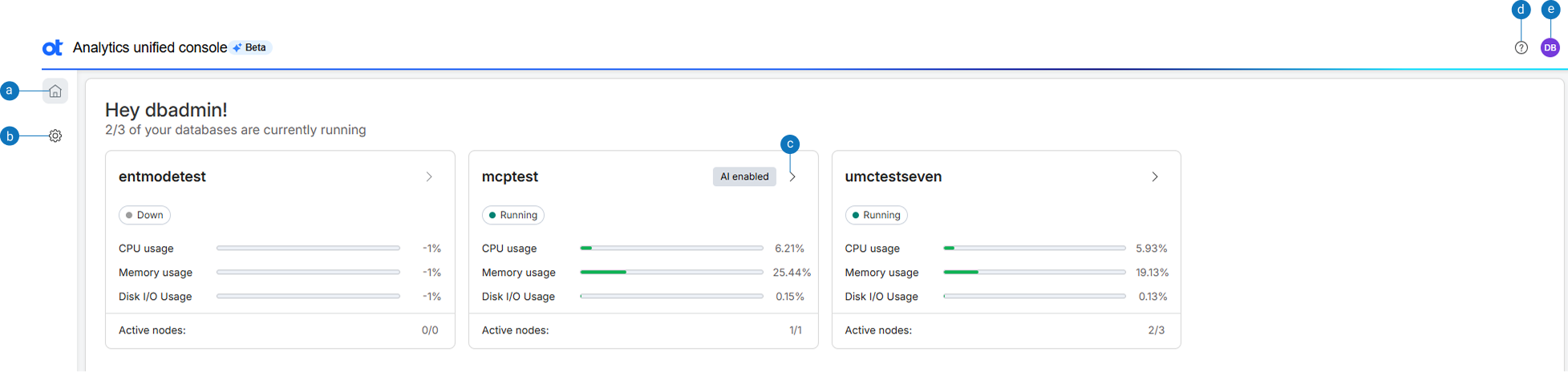
| Option | Description |
|---|---|
| a | Home: Displays the UC home page with database access options. |
| b | Settings: Displays the option to set AI preferences for the database. |
| c | >Open the SQL editor: Displays the SQL editor. |
| d | Help: Displays Unified console user documentation. |
| e | View profile: Displays the user profile along with options to switch and sign out of MC. |