Connect to Unified Console
Brief overview of connecting to UC
This section provides information about how you can access the Unified Console from your environment.
Prerequisistes
- Ensure that MC is installed and accessible.
- Ensure that you have valid MC user credentials.
- Use a supported web browser.
Connect to Unified Console
-
Open a supported web browser.
-
In the address bar, enter the URL of MC installation using either the host IP address or hostname, along with the configured MC port.
- IP address - https://ip-address:mc-port/ (Example: https://10.20.30.40:5450/)
Note
By default, `mc-port` is 5450. Alternatively, you can also enter a customized port number. - Host name - https://hostname:mc-port/ (Example: https://hostname:5450/)
- IP address - https://ip-address:mc-port/ (Example: https://10.20.30.40:5450/)
-
In the MC logon dialog, enter your username and password and click Log in.
Note
If you do not have an MC username/password, contact your administrator. -
Click the user profile icon. The user account menu is displayed.
-
Select Switch to Unified Console.
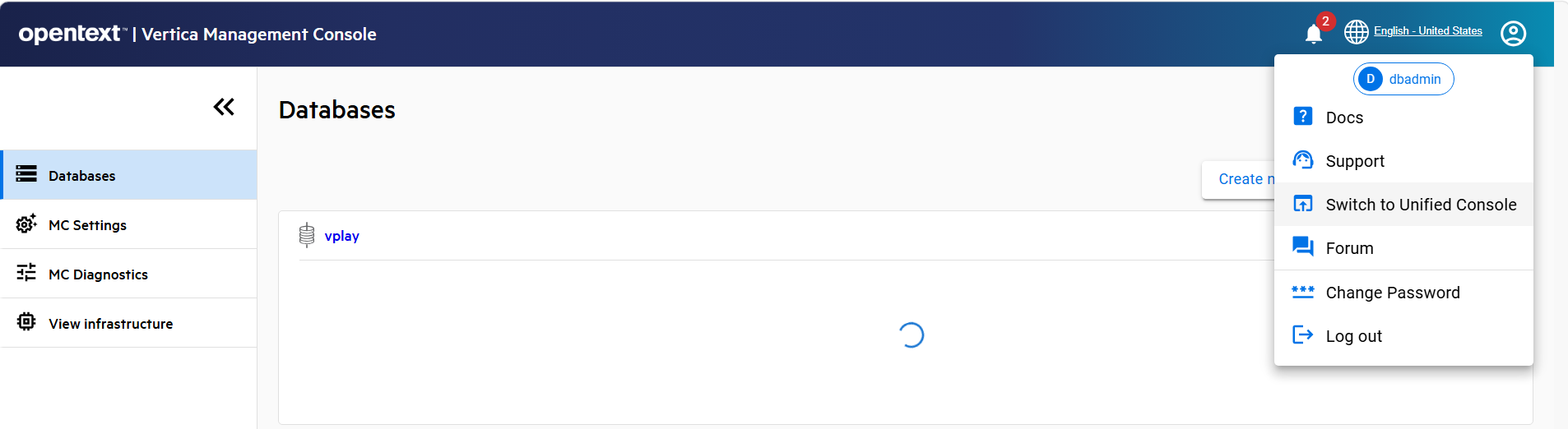 The Unified console is displayed.