This is the multi-page printable view of this section.
Click here to print.
Return to the regular view of this page.
MCP server
MCP server is a secure, JWT-authenticated server that implements Model Context Protocol (MCP) for database interactions between your database and AI agents.
The Vertica MCP server is a secure, JWT-authenticated server that implements Model Context Protocol (MCP) for database interactions between your database and AI agents. It provides MCP tools for executing queries, managing job queues, and interacting with the database through APIs.
Starting in release 26.3, the Vertica MCP server is installed separately as a standalone RPM with its own release cadence. Each MCP server release supports the most recent release of Vertica.
Note
For Vertica MCP server release 26.3, you must use Vertica database version 26.2.0-1, not the base 26.2 release.
The Vertica MCP server has the following installation and network requirements:
- The Vertica MCP server RPM cannot be installed on a host that has Vertica installed, whether Vertica is running or not.
- There is a limit of one MCP server per database. If you have multiple databases, you must install the MCP server on a separate host for each database.
- AI agents can connect to multiple MCP servers, allowing a single agent to query multiple Vertica databases. Each MCP server connection uses a unique JWT token.
See Network requirements for more specifics.
Prerequisites
System requirements
Operating System: Linux (RHEL/CentOS).
The MCP server host system cannot have Vertica installed.
Note
The MCP server is not yet supported on Kubernetes. Support will be added in a later release.
Network requirements
The following ports must be accessible through the firewall:
- 8667: Default port for MCP server. Must be open for HTTPS connection.
- 8665: Default for VCluster services.
The MCP server and must have network access to your database cluster to route SQL queries to your subcluster or sandbox.
Database access
- Valid database credentials.
- Database user with appropriate permissions to execute intended queries.
- Network connectivity to the database server.
Installing the MCP server
See Installing the MCP server RPM for more information.
Obtaining JWT tokens
After starting the MCP server, JWT tokens are required for authentication. Each token contains encrypted database credentials and user information. You can either use the interactive generator to create tokens or input parameters in the command line.
Generating a token using the interactive generator
Run the following and respond to the prompts:
$ /opt/vertica/bin/vertica_mcp_server --generate-token
Missing required parameters for non-interactive mode (--userid and --dbpass).
Falling back to interactive token generation...

═══════════════════════════════════════════════════════════════
              JWT Token Generator for MCP Server
                (with LevelDB Storage & VCluster)
═══════════════════════════════════════════════════════════════

Enter User ID: mcp_admin
Enter Database User: dbadmin
Enter Database Password:
Enter Expiration (days from now, default 365):
Enter Description (optional):
Enter VCluster Roles (comma-separated, allowed: 'admin', 'operator', 'viewer'; optional): admin
Generating JWT token...

✓ Token generated successfully!

Token Details:
  User ID:      mcp_admin
  DB User:      dbadmin
  Expires:      2027-06-09 06:03:12 EDT
  Valid Days:   365 days
  Roles:        [admin]
  Storage:      /opt/vertica/config/mcp_server/userdb

JWT Token:
<JWT_TOKEN>

You can now use this token in your MCP client requests:
  curl -k -X POST https://localhost:8667/mcp \
    -H "Content-Type: application/json" \
    -H "X-Api-Key: <JWT_TOKEN>" \
    -d '{...}'
Run (with all parameters specified):
$ /opt/vertica/bin/vertica_mcp_server --generate-token \
>   --userid my_mcp_viewer \
>   --dbuser mydbuser \
>   --dbpass mypassword \
>   --description "my viewer" \
>   --roles "viewer"

✓ Token generated successfully!

Token Details:
  User ID:      my_mcp_viewer
  DB User:      mydbuser
  Expires:      2027-06-09 10:35:38 EDT
  Valid Days:   365 days
  Roles:        [viewer]
  Storage:      /opt/vertica/config/mcp_server/userdb

JWT Token:
<JWT_TOKEN>

You can now use this token in your MCP client requests:
  curl -k -X POST https://localhost:8667/mcp \
    -H "Content-Type: application/json" \
    -H "X-Api-Key: <JWT_TOKEN>" \
    -d '{...}'
Multiple tokens per user
A user can have multiple tokens registered in the MCP server. For example, to use different AI clients with separate tokens. Each token requires a unique user_id in the token registry, while sharing the same database username and password. The VCluster server role can be the same or different for each token.
For example, user Bob can register two tokens:
user_id: bob_claude: Mapped to Bob's database credentials with an operator role.user_id: bob_gemini: Mapped to the same credentials with a viewer role.
Admin tokens are an exception. To obtain full admin privileges, the user_id must be set to admin. Only one admin token can be registered at a time, consistent with how database admin privileges are managed. An admin user can still create additional tokens with other user IDs to perform non-admin tasks.
Token security best practices
- Use short expiration times for sensitive environments (30-90 days).
- Store tokens securely - treat them like passwords.
- Never commit tokens to version control.
- Rotate tokens regularly - regenerate before expiration.
- Use HTTPS only - never send tokens over unencrypted connections.
- Monitor audit logs - review authentication attempts.
VCluster server roles and permissions
The MCP server uses VCluster server role-based access control (RBAC) to manage user permissions. Each JWT token is associated with a database user account, and the VCluster server role. MCP user inherits all database privileges from the mapped database user account while VCluster server role assigned to that MCP user determines what VCluster operations they can perform through the MCP server.
Role overview
The following table provides a brief overview of VCluster server roles:
|
Role |
Description |
|
admin |
Full access to all VCluster server operations, including query execution, VCluster management, job queue operations, and user management. Inherits all database privileges from the mapped database user. |
|
operator |
Can view VCluster status, start/stop VCluster, and manage job queue operations. Cannot scale/configure VCluster or manage users. |
|
viewer |
Read-only access to view VCluster status and monitor job queue operations, providing subcluster and sandbox information that can be used to redirect queries issued via the MCP server to specific subclusters or sandboxes. Cannot perform administrative tasks. |
Note
Assign the operator role only to trusted users, as it allows them to start and stop the cluster.
Role permissions overview
The following table summarizes the operations available for each role:
|
Operation |
admin |
operator |
viewer |
|
Execute SQL queries |
✓ |
✓ |
✓ |
|
View schema/catalog |
✓ |
✓ |
✓ |
|
VCluster status / list |
✓ |
✓ |
✓ |
|
VCluster start/stop |
✓ |
✓ |
✗ |
|
VCluster scale/config |
✓ |
✓ |
✗ |
|
Create/manage MCP users |
✓ |
✗ |
✗ |
|
Job queue operations |
✓ |
✓ |
✓ |
1 - Installing the MCP server RPM
Install and configure the Vertica MCP server as a standalone RPM on a host that does not have Vertica installed.
The Vertica MCP server RPM cannot be installed on a host that has Vertica installed, whether Vertica is running or not. Install the MCP server on a dedicated host outside the Vertica cluster. An existing Vertica database cluster is not required at RPM installation time, but you must specify the required connection information before the MCP server can connect to the database.
Upgrading from a bundled MCP server to a standalone MCP server
Vertica version 26.2 and earlier bundle the MCP server with the database. To upgrade to the 26.3 standalone MCP server from an earlier release:
- Upgrade the Vertica cluster to version 26.2.0-1.
- On a host that does not have Vertica installed, install the MCP server RPM by following the steps described here.
Installing the MCP server
-
As root or with sudo, install the vertica-mcp-server RPM:
MCP_OWNER_USER=mcpuser rpm -Uvh --replacepkgs --ignoresize mcp_server_rpm
where mcp_server_rpm is the RPM path and filename, for example /tmp/vertica-mcp-server-26.3.0-0.x86_64.rpm.
MCP_OWNER_USER sets the operating system user that owns the MCP server installation. The default value is mcpuser. Use --owner-user to specify a different user.
On success, you should see the following output:
Installed MCP binary to /opt/vertica/bin/vertica_mcp_server
Ensured log directory exists at /opt/vertica/log
Set ownership to mcpuser:mcpuser
The installation process runs a compatibility check with the Vertica cluster. The check is skipped if the cluster is not reachable or the cluster URL is not provided at installation time.
-
Confirm the installed RPM version:
rpm -qa vertica-mcp-server
The output shows the installed version, for example:
vertica-mcp-server-26.3.0-0.x86_64
-
Switch to the MCP user:
Caution
You must switch to the MCP user before starting the MCP server for the first time. Starting the server as root sets incorrect permissions on /opt/vertica/config and /opt/vertica/log. If you start the server as root, you must manually correct permissions on those directories before the MCP user can start the server.
-
View the contents of the MCP server configuration file:
cat /opt/vertica/config/mcp_server.yaml
The file contains default values after a fresh installation, for example:
# MCP Server Configuration File
# This file was auto-generated with default values
#
# Configuration priority (highest to lowest):
# 1. Environment variables (MCP_*)
# 2. This YAML file
# 3. Built-in defaults
#
# For environment variable overrides, use:
# MCP_SERVER_ADDR, MCP_LOG_DIR, MCP_SSL_BASE_PATH, etc.
#

server_addr: :8667
read_timeout: 15s
write_timeout: 1m40s
idle_timeout: 1m0s
shutdown_timeout: 30s
max_header_bytes: 1048576
ssl_base_path: /opt/vertica/config/mcp_server
ssl_cert_path: /opt/vertica/config/mcp_server/server.pem
ssl_key_path: /opt/vertica/config/mcp_server/server.key
ca_cert_path: /opt/vertica/config/mcp_server/ca.pem
ca_key_path: /opt/vertica/config/mcp_server/ca.key
use_pg_client: false
vertica_host: vnode1
vertica_port: "5433"
vertica_dbname: ""
vertica_sslmode: require
query_timeout: 20s
max_query_rows: 10000
storage_type: leveldb
storage_path: /opt/mcp_storage/userdb
vcluster_enabled: true
vcluster_server_url: https://vnode1:8665
vcluster_cert_path: /opt/vertica/config/vcluster_server/admin.pem
vcluster_key_path: /opt/vertica/config/vcluster_server/admin.key
vcluster_ca_cert_path: /opt/vertica/config/vcluster_server/ca.pem
vcluster_skip_tls_verify: true
vcluster_nodes_cache_ttl: 5m0s
log_dir: /opt/vertica/log
max_active_jobs: 5
max_running_jobs: 3
max_finished_jobs: 50
finished_job_retention: 240h0m0s
query_tree_retention: 8760h0m0s
external_url: ""
node_host_overrides:
    192.168.1.101: vnode1
    192.168.1.102: vnode2
    192.168.1.103: vnode3
    192.168.1.104: vnode4
job_queue_path: /opt/mcp_storage/job_queue
-
Edit the following fields in mcp_server.yaml:
vi /opt/vertica/config/mcp_server.yaml
vertica_host: The hostname or IP address of the Vertica database server.vertica_dbname: The name of the Vertica database to connect to.vcluster_server_url: The URL of the VCluster Web Service, for example https://<vcluster_server_node>:8665.
Note
If you are upgrading from a previous bundled MCP server deployment, you can use your existing mcp_server.yaml config file instead of manually editing the default values.
-
Copy the VCluster server SSL certificate files to the MCP server host.
scp -r <vcluster-server-node>:/opt/vertica/config/vcluster_server/admin.pem <mcp-server-node>:/opt/vertica/config/vcluster_server/
scp -r <vcluster-server-node>:/opt/vertica/config/vcluster_server/admin.key <mcp-server-node>:/opt/vertica/config/vcluster_server/
scp -r <vcluster-server-node>:/opt/vertica/config/vcluster_server/ca.pem <mcp-server-node>:/opt/vertica/config/vcluster_server/
-
Start the MCP server:
/opt/vertica/bin/manage_mcp_server.sh start mcp_server
On success, you should see output similar to the following:
Doing action start
Starting MCP server
Started MCP server with PID 874791
MCP server startup verified successfully
Verify that the MCP server binary exists at /opt/vertica/bin/vertica_mcp_server and certificate files exist at /opt/vertica/config/mcp_server.
-
Generate a JWT token for the MCP server. For more information about JWT token generation options, see MCP server.
/opt/vertica/bin/vertica_mcp_server --generate-token --userid user_id --dbpass password
-
Copy the JWT token string from the output of the previous command.
-
Update your AI agent configuration with the JWT token and the MCP server URL. The steps required depend on the type of agent you are using.
For an example using Claude Desktop, see Claude Desktop example.
The MCP server URL has the following format: https://<mcp_server_node>:8667/mcp
The AI agent can now connect to the database and query data.
Starting and stopping the MCP server
Switch to the MCP user and run the following command to start the MCP server:
/opt/vertica/bin/manage_mcp_server.sh start mcp_server
To stop the MCP server:
/opt/vertica/bin/manage_mcp_server.sh stop mcp_server
Uninstalling the MCP server
To uninstall the MCP server:
rpm -e vertica-mcp-server
To verify uninstallation:
rpm -qa | grep -i vertica-mcp-server
After uninstallation, the MCP server binary is removed from /opt/vertica/bin. The configuration .yaml file and log files are preserved.
2 - MCP server environment variables
Configure the Vertica MCP server with environment variables and a YAML configuration file.
The Vertica MCP server is configured through a YAML configuration file and environment variables, with the following order of precedence:
- Environment variables
- YAML configuration file (default path:
/opt/vertica/config/mcp_server.yaml)
- Built-in defaults
The following sections list the available environment variables and their corresponding YAML keys, grouped by area: server, TLS/SSL, database, storage and secrets, VCluster server, and job queue settings.
Note
Duration values (timeouts, TTLs, and retentions) accept Go duration strings, such as 30s, 5m, 1h30m, or 240h.
Server settings
These variables control the HTTP server's network and request-handling behavior.
|
Environment variable |
YAML key |
Default value |
Description |
MCP_SERVER_ADDR |
server_addr |
:8667 |
Listen address for the MCP server (for example, :8667). |
MCP_READ_TIMEOUT |
read_timeout |
15s |
Maximum duration to read a full HTTP request. |
MCP_WRITE_TIMEOUT |
write_timeout |
100s |
Maximum duration to write an HTTP response. |
MCP_IDLE_TIMEOUT |
idle_timeout |
60s |
Maximum idle time on keep-alive connections. |
MCP_SHUTDOWN_TIMEOUT |
shutdown_timeout |
30s |
Maximum wait time for graceful server shutdown. |
MCP_MAX_HEADER_BYTES |
max_header_bytes |
1048576 (1 MB) |
Maximum bytes parsed from request headers. |
MCP_LOG_DIR |
log_dir |
/opt/vertica/log |
Directory where server log files are written. |
MCP_EXTERNAL_URL |
external_url |
(empty) |
External base URL for building download links (for example, profile exports and query trees). Set this when the server runs behind Docker, proxies, or firewalls so that generated links are reachable from outside. |
TLS/SSL settings
The MCP server requires TLS. If it does not find a certificate/key pair at startup, it automatically generates a self-signed CA and server certificate.
Note
MCP_SSL_BASE_PATH is applied first. Individual certificate paths (MCP_SSL_CERT_PATH, and so on) override the paths derived from the base path.
|
Environment variable |
YAML key |
Default value |
Description |
MCP_SSL_BASE_PATH |
ssl_base_path |
/opt/vertica/config/mcp_server |
Base directory for TLS files. Certificate and key paths are derived from this if not set individually. |
MCP_SSL_CERT_PATH |
ssl_cert_path |
<ssl_base_path>/server.pem |
Path to the TLS server certificate (PEM format). |
MCP_SSL_KEY_PATH |
ssl_key_path |
<ssl_base_path>/server.key |
Path to the TLS server private key. |
MCP_CA_CERT_PATH |
ca_cert_path |
<ssl_base_path>/ca.pem |
Path to the root CA certificate for client verification. |
MCP_CA_KEY_PATH |
ca_key_path |
<ssl_base_path>/ca.key |
Path to the CA private key. |
Database settings
These variables configure the connection to the Vertica database.
Note
VERTICA_HOSTS accepts a comma-separated list of hostnames (for example, host1,host2,host3). Duplicate entries are automatically removed.
|
Environment variable |
YAML key |
Default value |
Description |
VERTICA_HOST |
vertica_host |
localhost |
Vertica host to which the MCP server connects. |
VERTICA_PORT |
vertica_port |
5433 |
Vertica server port. |
VERTICA_DBNAME |
vertica_dbname |
(empty — server default) |
Database name. If empty, the server's default database is used. |
VERTICA_SSLMODE |
vertica_sslmode |
disable |
TLS mode for the Vertica connection. Accepted values are disable, require, verify-ca, and verify-full. This setting is not supported by the native Vertica client (the default client); if you use the native client, set it to disable. |
MCP_USE_PG_CLIENT |
use_pg_client |
false |
Use the PostgreSQL wire protocol client instead of the native Vertica client. |
MCP_QUERY_TIMEOUT |
query_timeout |
20s |
Maximum duration for a single database query. |
MCP_MAX_QUERY_ROWS |
max_query_rows |
10000 |
Maximum rows returned per query to prevent runaway result sets. |
MCP_USE_LOAD_BALANCING |
use_load_balancing |
false |
Enable connection load balancing for the Vertica native client. |
Storage and secrets
These variables control how user credentials are stored and internal secrets are managed.
Note
MCP_JWT_SECRET is sensitive. Never store it in the YAML file. Always supply it as an environment variable.
|
Environment variable |
YAML key |
Default value |
Description |
MCP_STORAGE_TYPE |
storage_type |
leveldb |
Backend used to store credentials. Accepted values are leveldb and memory. |
MCP_STORAGE_PATH |
storage_path |
/opt/vertica/config/mcp_server/userdb |
Filesystem path for the LevelDB database directory. |
MCP_STORAGE_ENCRYPTION_KEY |
(internal) |
(derived from server key) |
32-byte AES key for encrypting passwords at rest. If not set, a key is automatically derived from the server private key file using SHA-256. |
MCP_JWT_SECRET |
(internal) |
(derived from server key) |
HMAC secret used for signing and verifying API key JWTs. Derived from the server key at startup if not explicitly set. |
VCluster server settings
These variables configure integration with VCluster server, which provides cluster-management tools.
Note
If the client certificate or private key at the configured paths is missing or invalid, VCluster tools are automatically disabled at startup.
|
Environment variable |
YAML key |
Default value |
Description |
MCP_VCLUSTER_ENABLED |
vcluster_enabled |
true |
Enable or disable VCluster server tools. |
MCP_VCLUSTER_SERVER_URL |
vcluster_server_url |
https://localhost:8665 |
Base URL of the VCluster server API. |
MCP_VCLUSTER_CERT_PATH |
vcluster_cert_path |
/opt/vertica/config/vcluster_server/admin.pem |
Path to the client certificate for authenticating with VCluster server. |
MCP_VCLUSTER_KEY_PATH |
vcluster_key_path |
/opt/vertica/config/vcluster_server/admin.key |
Path to the private key for the VCluster server client certificate. |
MCP_VCLUSTER_CA_CERT_PATH |
vcluster_ca_cert_path |
/opt/vertica/config/vcluster_server/ca.pem |
CA certificate for verifying the VCluster server TLS certificate. Leave this empty to use system defaults. |
MCP_VCLUSTER_SKIP_TLS_VERIFY |
vcluster_skip_tls_verify |
true |
When true, skips TLS server verification for VCluster connections. Enabled by default; set to false in production to enforce verification. |
MCP_VCLUSTER_NODES_CACHE_TTL |
vcluster_nodes_cache_ttl |
5m |
How long the node topology is cached before a refresh is triggered. |
Job queue settings
These variables tune the server's internal asynchronous job queue for long-running operations.
|
Environment variable |
YAML key |
Default value |
Description |
MCP_MAX_ACTIVE_JOBS |
max_active_jobs |
50 |
Total queue capacity, including both pending and running jobs. |
MCP_MAX_RUNNING_JOBS |
max_running_jobs |
10 |
Maximum number of concurrently running jobs. |
MCP_MAX_FINISHED_JOBS |
max_finished_jobs |
100000 |
Maximum number of completed job records retained for status queries. |
MCP_FINISHED_JOB_RETENTION |
finished_job_retention |
240h (10 days) |
How long completed job records are kept before they are removed. |
MCP_QUERY_TREE_RETENTION |
query_tree_retention |
8760h (1 year) |
How long the generated query tree HTML files are kept before automatic cleanup. |
3 - Claude Desktop example
Examples for configuring and using the Vertica MCP server with Claude Desktop.
This page provides examples for configuring the Vertica MCP server with Claude Desktop.
Configuring MCP server with Claude Desktop
Claude Desktop can connect to your MCP server to enable database query capabilities within Claude conversations.
Prerequisites
- Claude Desktop installed (latest version).
- MCP server running and accessible.
- Valid JWT token for authentication.
- Certificates to access VCluster server from the database administrator. For database adminstrators, the default certificates are located at
/opt/vertica/config/vcluster_server/.
- NPX tool mcp-remote (
npm install -g mcp-remote).
Configuration
The Claude Desktop configuration file location varies by OS:
- macOS:
~/Library/Application Support/Claude/claude_desktop_config.json
- Windows:
%APPDATA%\Claude\claude_desktop_config.json
- Linux:
~/.config/Claude/claude_desktop_config.json
Edit the configuration file and add your MCP server. Example configuration:
{
  "mcpServers": {
    "vertica-mcp-server": {
      "command": "npx",
      "args": [
        "mcp-remote",
        "https://<mcp_server_node>/mcp",
        "--insecure",
        "--tls-skip-verify",
        "--cert",
        "<path_to_certificate>\\admin.pem",
        "--key",
        "<path_to_key_file>\\admin.key",
        "--ca-cert".
        "<path_to_ca_cert>\\ca.pem",
        "--header",
        "X-API-Key:${API_KEY_VALUE}"
        ],
      "env": {
        "NODE_TLS_REJECT_UNAUTHORIZED": "0",
        "API_KEY_VALUE": "replace with your API key"
      }
    }
  }
}
where
<path_to_certificate> is the path to the admin.pem file, such as "C:\Users\username\vcluster_server\admin.pem".
<path_to_key_file> is the path to the admin.key file, such as "C:\Users\username\vcluster_server\admin.key".
<path_to_ca_cert> is the path to the ca.pem file, such as "C:\Users\username\vcluster_server\ca.pem".
Verifying the configuration
- Restart Claude Desktop after saving the configuration (make sure kill all background processes)
- Check Claude's MCP status - look for your server in the MCP panel
- Test with a simple query:
SELECT version()
4 - Curl examples
Examples for using the Vertica MCP server with curl for testing and automation.
This page provides curl examples for testing and automating interactions with the Vertica MCP server. This is provided as a developer guide for interacting with the APIs.
Using the MCP server with curl
For testing and automation, you can interact with the MCP server directly using curl.
All MCP requests use JSON-RPC 2.0 format:
curl -k -X POST https://localhost:8667/mcp \
  -H "Content-Type: application/json" \
  -H "X-Api-Key: YOUR_JWT_TOKEN" \
  -d '{
    "jsonrpc": "2.0",
    "method": "METHOD_NAME",
    "params": {
      "key": "value"
    },
    "id": 1
  }'
Initialize connection
First, initialize the MCP session:
curl -k -X POST https://localhost:8667/mcp \
  -H "Content-Type: application/json" \
  -H "X-Api-Key: eyJhbGciOiJIUzI1NiIsInR5cCI6IkpXVCJ9..." \
  -d '{
    "jsonrpc": "2.0",
    "method": "initialize",
    "params": {
      "protocolVersion": "2024-11-05",
      "capabilities": {
        "roots": {
          "listChanged": true
        }
      },
      "clientInfo": {
        "name": "curl-client",
        "version": "1.0.0"
      }
    },
    "id": 1
  }'
Response:
{
  "jsonrpc": "2.0",
  "id": 1,
  "result": {
    "protocolVersion": "2024-11-05",
    "serverInfo": {
      "name": "vertica-mcp-server",
      "version": "1.0.0"
    },
    "capabilities": {
      "tools": {},
      "resources": {},
      "prompts": {}
    }
  }
}
Discover what tools are available:
curl -k -X POST https://localhost:8667/mcp \
  -H "Content-Type: application/json" \
  -H "X-Api-Key: eyJhbGciOiJIUzI1NiIsInR5cCI6IkpXVCJ9..." \
  -d '{
    "jsonrpc": "2.0",
    "method": "tools/list",
    "params": {},
    "id": 2
  }'
Response:
{
  "jsonrpc": "2.0",
  "id": 2,
  "result": {
    "tools": [
      {
        "name": "execute_query",
        "description": "Execute SQL queries against Vertica database",
        "inputSchema": {
          "type": "object",
          "properties": {
            "query": {
              "type": "string",
              "description": "SQL query to execute"
            },
            "subcluster": {
              "type": "string",
              "description": "Optional subcluster name"
            }
          },
          "required": ["query"]
        }
      },
      {
        "name": "submit_queue_query",
        "description": "Submit long-running query to job queue"
      },
      {
        "name": "list_jobs",
        "description": "List all jobs in the queue"
      }
    ]
  }
}
Execute a query
Run a simple SQL query:
curl -k -X POST https://localhost:8667/mcp \
  -H "Content-Type: application/json" \
  -H "X-Api-Key: eyJhbGciOiJIUzI1NiIsInR5cCI6IkpXVCJ9..." \
  -d '{
    "jsonrpc": "2.0",
    "method": "tools/call",
    "params": {
      "name": "execute_query",
      "arguments": {
        "query": "SELECT version()"
      }
    },
    "id": 3
  }'
Response:
{
  "jsonrpc": "2.0",
  "id": 3,
  "result": {
    "content": [
      {
        "type": "text",
        "text": "{\"columns\":[\"version\"],\"rows\":[{\"version\":\"Vertica Analytic Database v24.3.0-0\"}],\"count\":1}"
      }
    ]
  }
}
Execute query with subcluster routing
Route query to a specific subcluster:
curl -k -X POST https://localhost:8667/mcp \
  -H "Content-Type: application/json" \
  -H "X-Api-Key: eyJhbGciOiJIUzI1NiIsInR5cCI6IkpXVCJ9..." \
  -d '{
    "jsonrpc": "2.0",
    "method": "tools/call",
    "params": {
      "name": "execute_query",
      "arguments": {
        "query": "SELECT node_name, subcluster_name FROM nodes",
        "subcluster": "analytics_cluster"
      }
    },
    "id": 4
  }'
Submit long-running query to queue
For complex analytics queries that take longer to complete:
curl -k -X POST https://localhost:8667/mcp \
  -H "Content-Type: application/json" \
  -H "X-Api-Key: eyJhbGciOiJIUzI1NiIsInR5cCI6IkpXVCJ9..." \
  -d '{
    "jsonrpc": "2.0",
    "method": "tools/call",
    "params": {
      "name": "submit_queue_query",
      "arguments": {
        "query": "SELECT customer_id, SUM(amount) FROM sales GROUP BY customer_id",
        "description": "Monthly sales by customer"
      }
    },
    "id": 5
  }'
Response:
{
  "jsonrpc": "2.0",
  "id": 5,
  "result": {
    "content": [
      {
        "type": "text",
        "text": "Job submitted successfully. Job ID: 550e8400-e29b-41d4-a716-446655440000"
      }
    ]
  }
}
Check job status
curl -k -X POST https://localhost:8667/mcp \
  -H "Content-Type: application/json" \
  -H "X-Api-Key: eyJhbGciOiJIUzI1NiIsInR5cCI6IkpXVCJ9..." \
  -d '{
    "jsonrpc": "2.0",
    "method": "tools/call",
    "params": {
      "name": "get_job",
      "arguments": {
        "job_id": "550e8400-e29b-41d4-a716-446655440000"
      }
    },
    "id": 6
  }'
List all jobs
curl -k -X POST https://localhost:8667/mcp \
  -H "Content-Type: application/json" \
  -H "X-Api-Key: eyJhbGciOiJIUzI1NiIsInR5cCI6IkpXVCJ9..." \
  -d '{
    "jsonrpc": "2.0",
    "method": "tools/call",
    "params": {
      "name": "list_jobs",
      "arguments": {}
    },
    "id": 7
  }'
Cancel a job
curl -k -X POST https://localhost:8667/mcp \
  -H "Content-Type: application/json" \
  -H "X-Api-Key: eyJhbGciOiJIUzI1NiIsInR5cCI6IkpXVCJ9..." \
  -d '{
    "jsonrpc": "2.0",
    "method": "tools/call",
    "params": {
      "name": "cancel_job",
      "arguments": {
        "job_id": "550e8400-e29b-41d4-a716-446655440000"
      }
    },
    "id": 8
  }'
Health check
Check server health without authentication:
curl -k https://localhost:8667/health
Response:
{
  "status": "healthy",
  "total_pools": 3,
  "max_pools": 100
}
Using jq for pretty output
Format JSON responses with jq:
curl -k -X POST https://localhost:8667/mcp \
  -H "Content-Type: application/json" \
  -H "X-Api-Key: eyJhbGciOiJIUzI1NiIsInR5cCI6IkpXVCJ9..." \
  -d '{
    "jsonrpc": "2.0",
    "method": "tools/call",
    "params": {
      "name": "execute_query",
      "arguments": {
        "query": "SELECT table_name FROM tables LIMIT 5"
      }
    },
    "id": 1
  }' | jq '.'
Bash script example
Create a reusable script for queries:
#!/bin/bash
# mcp_query.sh

API_KEY="eyJhbGciOiJIUzI1NiIsInR5cCI6IkpXVCJ9..."
SERVER="https://localhost:8667/mcp"
QUERY="$1"

if [ -z "$QUERY" ]; then
    echo "Usage: $0 'SQL QUERY'"
    exit 1
fi

curl -k -X POST "$SERVER" \
  -H "Content-Type: application/json" \
  -H "X-Api-Key: $API_KEY" \
  -d "{
    \"jsonrpc\": \"2.0\",
    \"method\": \"tools/call\",
    \"params\": {
      \"name\": \"execute_query\",
      \"arguments\": {
        \"query\": \"$QUERY\"
      }
    },
    \"id\": 1
  }" | jq -r '.result.content[0].text'
Usage:
chmod +x mcp_query.sh
./mcp_query.sh "SELECT COUNT(*) FROM customers"
5 - Query profiling
The Query Profiling feature in MCP server enables deep analysis of SQL queries, visualization of execution plans, and export of detailed query profile data.
The Query Profiling feature in MCP server enables deep analysis of SQL queries, visualization of execution plans, and export of detailed query profile data. These tools help you understand query performance, resource usage, and execution flow across Vertica nodes and subclusters.
Key features
- Profile storage in tables: Save query profiles in persistent tables within a specified schema, or use temporary tables for ad-hoc analysis.
- Large Language Model (LLM)-driven analysis: Analyze queries using the MCP server's LLM, which processes operator statistics and performance aggregates (such as execution time and resource usage) computed by profiling tools.
- Interactive plan tree visualization: Visualize query plan trees, including data flow volumes and execution times per node, with interactive HTML output.
- Export/import profile data: Export all profile tables as a compressed tarball (.tar.gz) for sharing or offline analysis, and import them into other clusters or tools.
- Subcluster and sandbox support: Profile query execution on specific subclusters or sandboxes by routing requests to the desired subcluster or sandbox.
- Prompt support: Configure and execute analysis prompts with flexible input parameters to tailor profiling to your specific needs.
Profiling workflows
Query profiling supports two distinct workflows:
- Profile and analyze using prompts – A guided, step-by-step approach where the LLM orchestrates the entire workflow, including job monitoring and analysis generation.
- Direct tool access – Ask the LLM to use specific profiling tools directly without the built-in prompts, giving you fine-grained control over each step.
Both approaches produce the same profiling results that can be visualized, exported, and imported. Choose the approach that best fits your workflow.
Profile and analyze a query using prompts
-
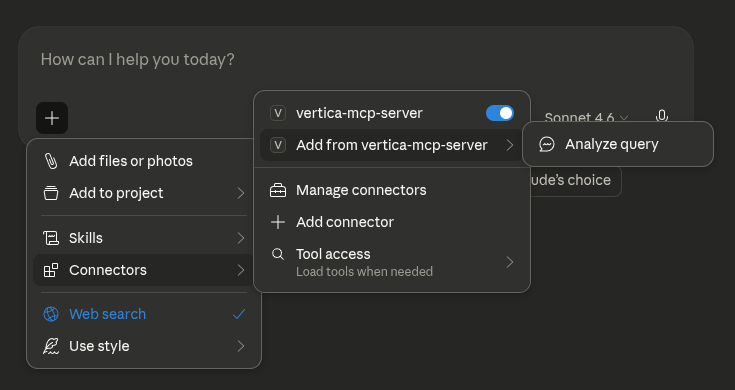
In the LLM, click Add Connectors, select Add from vertica-mcp-server, and then click Analyze Query.
-
To begin profiling a SQL query, enter the required prompt details and click Add prompt:
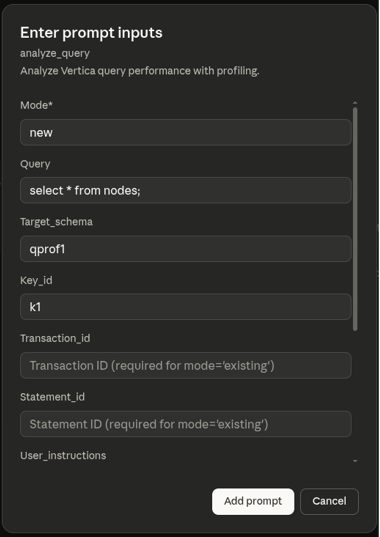
- Mode: Set to
new to execute and profile a new query, or existing to analyze a previously executed query by providing its transaction ID and statement ID.
- Query: The query you want to profile (for example,
select avg(price) from sales;).
- Target_schema: The schema where results will be stored (for example,
qprof1). A new schema is automatically created if it does not already exist.
- Key_id: A unique identifier for this profiling run (for example,
k1). Profile table names have this ID appended (for example, qprof_query_profiles_k1).
- Transaction_id: The transaction id for an existing query.
- Statement_id: The statement id for an existing query.
- User_instructions: Additional instructions to customize the analysis.
- Analysis_scope: Specify the depth of analysis (
basic or detailed). Defaults is basic.
- Subcluster: The subcluster where the query should be executed.
- Sandbox: The sandbox where the query should be executed. If both subcluster and sandbox are specified, sandbox is ignored.
Note
- Transaction ID and Statement ID: Provide
Transaction_id and Statement_id to profile an already-executed query, or provide Query with Mode=new to execute and profile a new query. These fields are required when using Mode=existing, and should be left empty when using Mode=new.
- Key ID: If you leave the Key ID blank for mode
existing, the system auto-generates a timestamp-based identifier. Using an explicit Key ID makes it easier to reference and retrieve your profiling results later.
-
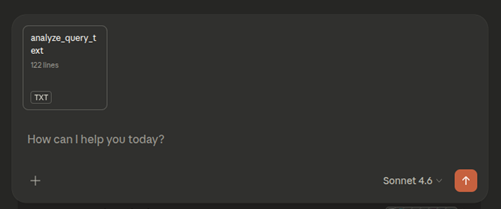
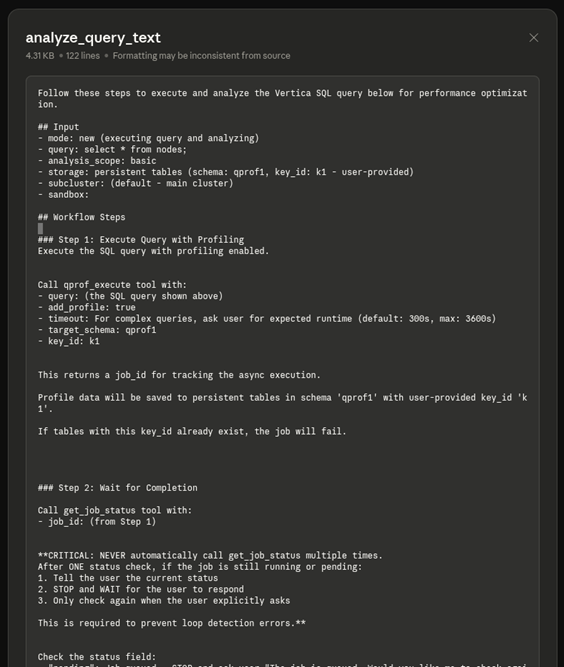
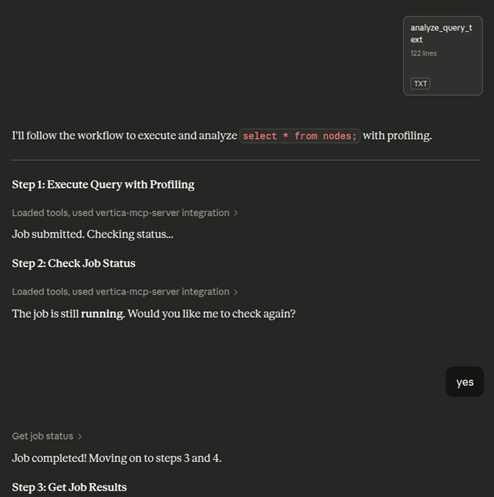
Click analyze_query_text in the chat to view the analysis workflow and tools the LLM will use.
Review workflow steps
The analysis workflow displays the following steps:
- Execute query: The
qprof_execute tool runs the query with profiling enabled.
- Generate job ID: A
job_id is created to track the asynchronous execution.
- Monitor completion: The LLM checks the job status once. If still running, it pauses and waits for your confirmation before checking again to prevent infinite loops.
Execute, monitor, and review analysis
When processing your analysis, the LLM performs these steps:
- Submit and monitor: The job is submitted and checked for completion. If still running, the LLM pauses and requests confirmation before checking again.
- Generate summary: Once the job completes, the LLM produces a comprehensive profile analysis, including performance assessment, key metrics (duration, success, queue wait time, nodes involved), bottleneck analysis, and optimization recommendations.
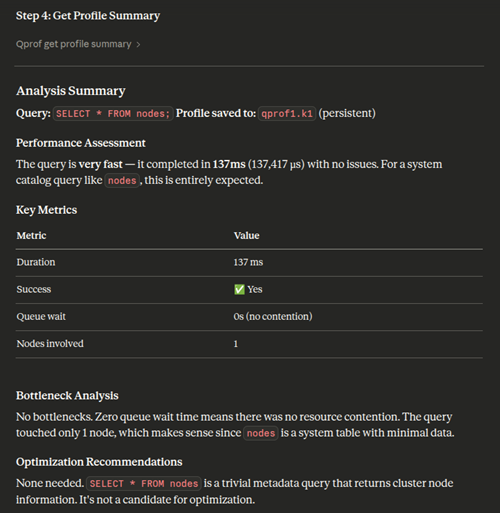
Profile storage
Profile data persists in the specified database schema and tables.
Analyze query profiles directly
Alternatively, you can ask the LLM to use specific profiling tools without the built-in prompts. This approach gives you direct control and works independently of the prompt-based workflow.
To use these tools, ask the LLM directly in the chat. For example, "Analyze this query profile using qprof_get_operator_stats" or "Get a summary of my query execution".
You can also analyze existing query profiles saved from previous runs. Provide the schema and key ID where the profile data is stored. For example: "Give me a summary of the query profile that is saved in the schema xyz with key slow_query". This is useful for analyzing historical query executions without re-executing them.
Available tools:
qprof_get_profile_summary: Get a high-level summary of the query execution, including duration, status, and resource usage.qprof_get_events: Retrieve warnings, optimization hints, and execution issues.qprof_get_resources: Examine resource pool acquisition details and queue wait times.qprof_get_steps: See a detailed breakdown of execution phases and timing.qprof_get_operator_stats: Analyze operator-level performance metrics (for example, slowest operators, memory usage).qprof_get_path_stats: View aggregated statistics at the query plan path level.qprof_get_plan: Get the raw EXPLAIN plan for the query.qprof_get_plan_tree: Retrieve the complete query plan tree with structure, metrics, and operator details. This is best suited for LLM or programmatic analysis.
Each tool provides a focused view or set of metrics to help you understand and troubleshoot query performance.
Visualize, export, and import results
The following capabilities work with both profiling approaches above. Use them to interact with and share your profiling data.
Visualize query profile tree
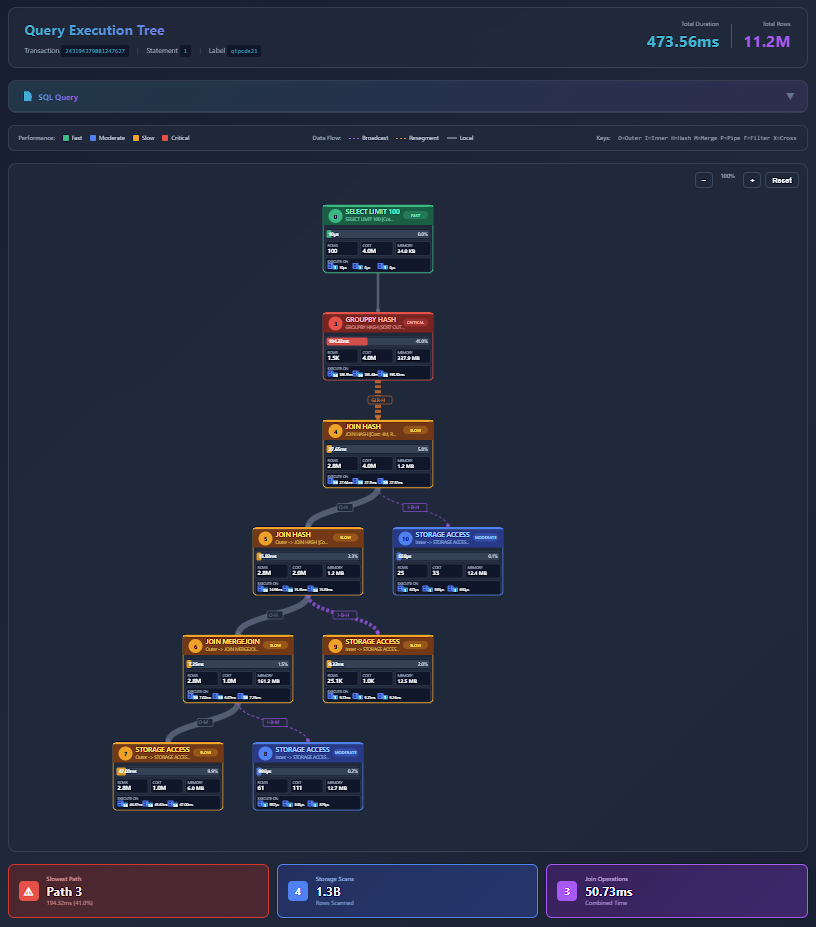
You can visualize the query execution tree by asking the LLM to generate an interactive visualization:
- Ask the LLM to visualize the query profile tree. Optionally, provide your MCP server IP and port.
- The LLM generates an HTML file saved on the MCP server and provides a link to view it. To access the link, ensure you have network access to the MCP server's IP address and port (accounting for any port mappings in your environment).
- Open the provided link in a browser to view the visualization.
- The visualization tree displays all the details of the query profile. You can zoom in and out and interact with the query tree to analyze query execution.
Note
The query profile tree is generated as an HTML file on the MCP server rather than sent directly to your agent. This approach significantly reduces token usage. Alternatively, you can request an embedded object format to load the tree directly in agents such as Claude Desktop, though this option requires more tokens.
Export query profile data
You can export all profile tables as a compressed tarball (.tar.gz) for sharing or further analysis.
- Ask the LLM to export the profiling data.
- The system generates the profile export details and a download link for the profile tarball (.tar.gz).
- Open the link in a browser to download the tarball (.tar.gz) to share or analyze offline.
Import and analyze query profiles
You can import profile data from other clusters or tools for analysis in your current environment. You can also import a tarball (.tar.gz) into VCluster using Query Profile and use the target schema and key ID to analyze using the MCP Server Query Profiling tools. For more information about Query Profile in the VCluster UI, see Query Profile.
6 - Machine learning with the MCP server
The MCP server provides integrated machine learning (ML) tools that support end-to-end, in-database data science workflows through natural-language interaction.
The MCP server extends beyond SQL execution by providing integrated machine learning (ML) capabilities that support end-to-end data science workflows directly within the database. Using MCP tools and natural-language interaction, you can explore and prepare data, perform train-test splits, train and evaluate models, generate predictions, and interpret results without moving data out of Vertica or writing external code.
This in-database approach eliminates traditional ML pipeline complexity and preserves security and governance, while allowing you to iterate quickly through conversational, AI-assisted workflows. The integrated ML tools make advanced analytics accessible to both experienced data scientists and users with limited machine learning expertise, allowing them to build predictive models and derive actionable insights using simple natural-language prompts.
For users familiar with VerticaPy, the MCP server provides a no-code alternative for accessing similar in-database ML functionality without relying on VerticaPy or its associated dependencies.
For a complete reference of every ML tool, its input schema, and outputs, see ML tools reference.
Prerequisites
Before you run ML workflows, make sure the following requirements are met:
- The MCP server is running and your AI client is connected. For installation, startup, JWT token generation, and role and privilege requirements, see MCP server.
- Install the
MachineLearningLib UDx library and the approximate package on the target database. These are required to run the ML tools. For installation steps, see install_packages.
- The ML tools rely on in-database machine learning functions, which are available in both Enterprise Mode and Eon Mode. Some tools have additional version requirements. For example,
ml_correlation_matrix uses CORR_MATRIX, which requires version 9.2.1 or later.
The MCP server provides a comprehensive set of tools that support the complete machine learning lifecycle, from data preparation through model governance. These tools can be combined to build end-to-end ML workflows using natural language.
Data preparation and feature engineering
|
Tool |
Description |
Key parameters |
ml_apply_encoding |
Applies a previously fit encoder or label mapping to a new source table (for example, test or inference data), enforcing the same NULL/unseen-category sentinel policy used at fit time. |
table, columns, encoding_type, encoder_model_name (for one_hot), label_mapping_tables (for label), output_table, overwrite, schema, subcluster (optional), sandbox (optional) |
ml_apply_normalize |
Applies a previously fit normalization model to a new source table, producing a normalized output table (async). |
table, columns (optional, for pre-flight validation), model_name, output_table, schema, subcluster (optional), sandbox (optional) |
ml_encode_columns |
Encodes categorical columns into numeric representations. Persists encoder artifacts for later reuse on test/inference data. |
table, columns, encoding_type (one_hot | label), output_table, schema, subcluster (optional), sandbox (optional) |
ml_impute |
Fills missing NULL values using a specified strategy. Results are materialized as a view (async). |
table, method (auto | mean | mode | ffill | bfill), columns, order_by (required for ffill/bfill), partition_columns, output_view, schema, subcluster (optional), sandbox (optional) |
ml_normalize |
Normalizes numeric columns and materializes the result as a view (async, no model persisted). |
table, columns, normalization_method (minmax | zscore | robust_zscore), output_view, schema, subcluster (optional), sandbox (optional) |
ml_normalize_fit |
Computes normalization parameters and persists them as a model in v_catalog.models. Optionally creates a normalized view. Use this when the same scaling must be applied consistently to train, test, and inference data. |
table, columns, normalization_method, model_name, output_view (optional), schema, subcluster (optional), sandbox (optional) |
ml_train_test_split |
Splits a source table into separate training and testing tables using a seeded random partition. |
table, test_ratio (default: 0.3), seed (default: 42), output_prefix, schema, subcluster (optional), sandbox (optional) |
Exploratory data analysis
|
Tool |
Description |
Key parameters |
ml_correlation_matrix |
Computes the pairwise correlation matrix for numeric columns. Uses CORR_MATRIX on Vertica 9.2.1 and later, with a fallback for older versions. |
table, columns (optional; defaults to all numeric/boolean columns), method (pearson | spearman | spearmand), schema, subcluster (optional), sandbox (optional) |
ml_detect_outliers |
Detects outliers in numeric columns using statistical thresholds. Read-only — no output table is created. |
table, columns, method (z_score | robust_zscore | iqr), threshold (default: 3.0 for z/robust, 1.5 for iqr), limit (default: 100), schema, subcluster (optional), sandbox (optional) |
Model training
|
Tool |
Description |
Key parameters |
ml_cross_validate |
Evaluates an ML algorithm using k-fold cross-validation, with optional hyperparameter grid search. Submits an async job. Supported algorithms: logistic_reg, linear_reg, naive_bayes, svm_classifier, svm_regressor. |
algorithm, input_table, predictor_columns, target_column, model_name, fold_count (default: 5), metrics, hyperparams, prediction_cutoff (logistic_reg only), params, schema, subcluster (optional), sandbox (optional) |
ml_train_model |
Trains Vertica in-database ML model. Submits an async job and returns a job_id immediately. Supported algorithms: logistic_reg, naive_bayes, rf_classifier, svm_classifier, xgb_classifier, linear_reg, rf_regressor, xgb_regressor, svm_regressor, pls_reg, poisson_reg, kmeans, bisecting_kmeans, kprototypes, pca, svd, iforest. |
algorithm, input_table, predictor_columns, target_column, model_name, num_clusters (for k-means variants), params, schema, subcluster (optional), sandbox (optional) |
ml_train_timeseries |
Trains a time-series model (ARIMA, AUTOREGRESSOR, or MOVING_AVERAGE). Supports univariate and multivariate (VAR) autoregressor models. Submits an async job. |
algorithm (arima | autoregressor | moving_average), input_table, timeseries_columns, timestamp_column, model_name, params, schema, subcluster (optional), sandbox (optional) |
Dimensionality reduction
|
Tool |
Description |
Key parameters |
ml_apply_pca |
Transforms data using a fitted PCA model and writes the principal component coordinates to an output table. |
table, columns, model_name, output_table (optional; defaults to mcp_pca_{table}_{timestamp}), num_components (optional), cutoff (optional; cannot be combined with num_components), match_by_pos (optional), key_columns (optional), schema, subcluster (optional), sandbox (optional) |
ml_apply_svd |
Applies a previously computed SVD model to a new data matrix and writes the transformed data to an output table. |
table, model_name, output_table, columns (optional; defaults to all columns), num_components (optional), exclude_columns (optional), key_columns (optional), schema, subcluster (optional), sandbox (optional) |
ml_pca |
Fits a PCA (Principal Component Analysis) model on a table and saves it in the Vertica model catalog. |
table, columns, model_name, num_components (optional), scale (optional), method (optional; only LAPACK), schema, subcluster (optional), sandbox (optional) |
ml_svd |
Performs Singular Value Decomposition (SVD) on a numeric data matrix and saves the model in v_catalog.models. |
table, model_name, columns (optional; defaults to all columns), num_components (optional), exclude_columns (optional), schema, subcluster (optional), sandbox (optional) |
Inference
|
Tool |
Description |
Key parameters |
ml_predict |
Runs predictions using a trained model and writes results to an output table. |
model_name, input_table, predictor_columns (optional), output_table, params, timestamp_column (time-series), num_predictions (time-series, default: 10), schema, subcluster (optional), sandbox (optional) |
ml_predict_with_registered_model |
Runs predictions by referencing a registered model family name instead of a raw model name. Automatically resolves the production version unless a specific version is supplied. |
registered_name, registered_version (optional), input_table, predictor_columns (optional), output_table, use_classes, params, timestamp_column, num_predictions, schema, subcluster (optional), sandbox (optional) |
Model evaluation
|
Tool |
Description |
Key parameters |
ml_classification_report |
Computes accuracy, precision, recall, F1 score, and optionally AUC from a predictions table. |
table, actual_column, predicted_column, include_auc (binary classification only), probability_column (required when include_auc is set), schema, subcluster (optional), sandbox (optional) |
ml_features_importance |
Computes normalized feature importance scores (0–100) from a trained model. Supports linear, tree-based, and time-series models. |
model_name, subcluster (optional), sandbox (optional) |
ml_regression_report |
Computes regression metrics (MAE, MSE, RMSE, R², adjusted R², AIC, BIC, quantile errors) from a predictions table. |
table, actual_column, predicted_column, metrics (optional list), num_predictors (default: 1), schema, subcluster (optional), sandbox (optional) |
Model registry and governance
|
Tool |
Description |
Key parameters |
ml_change_model_status |
Promotes or demotes a registered model version through the governance lifecycle. |
registered_name, registered_version, new_status (under_review | staging | production | archived | declined | unregistered), subcluster (optional), sandbox (optional) |
ml_get_model_status_history |
Fetches the native status-change audit history for a registered model from v_monitor.model_status_history. |
registered_name, registered_version (optional), subcluster (optional), sandbox (optional) |
ml_get_production_model |
Resolves the current production version for a registered model family. |
registered_name, subcluster (optional), sandbox (optional) |
ml_list_registered_models |
Lists registered model families and versions from v_catalog.registered_models. |
registered_name (optional filter), subcluster (optional), sandbox (optional) |
ml_register_model |
Registers a trained native Vertica model under a registered model family name for lifecycle management. |
model_name, registered_name, schema, subcluster (optional), sandbox (optional) |
Note
ml_register_model registers a trained model and adds it to the Model versioning environment with a status of under_review. The model must be registered by the model owner, dbadmin, or a user with the MLSUPERVISOR role.
After a model is registered, the model owner is automatically changed to Superuser, and the previous owner is granted USAGE privileges. Users with the MLSUPERVISOR role or dbadmin can call ml_change_model_status to change the status of registered models.
Models cannot move freely between statuses. For the six possible statuses and a diagram of the valid transitions, see Model versioning.
Run an ML workflow using prompts
Use the guided Vertica ML Workflow prompt when you want the MCP server to plan and run a complete pipeline for you. You supply a few input fields, such as the algorithm, table, and target, and the MCP server orchestrates the remaining steps, from preprocessing through evaluation. For an illustration of the alternative conversational approach, where you drive each stage with individual natural-language requests, see the customer churn example in the next section.
-
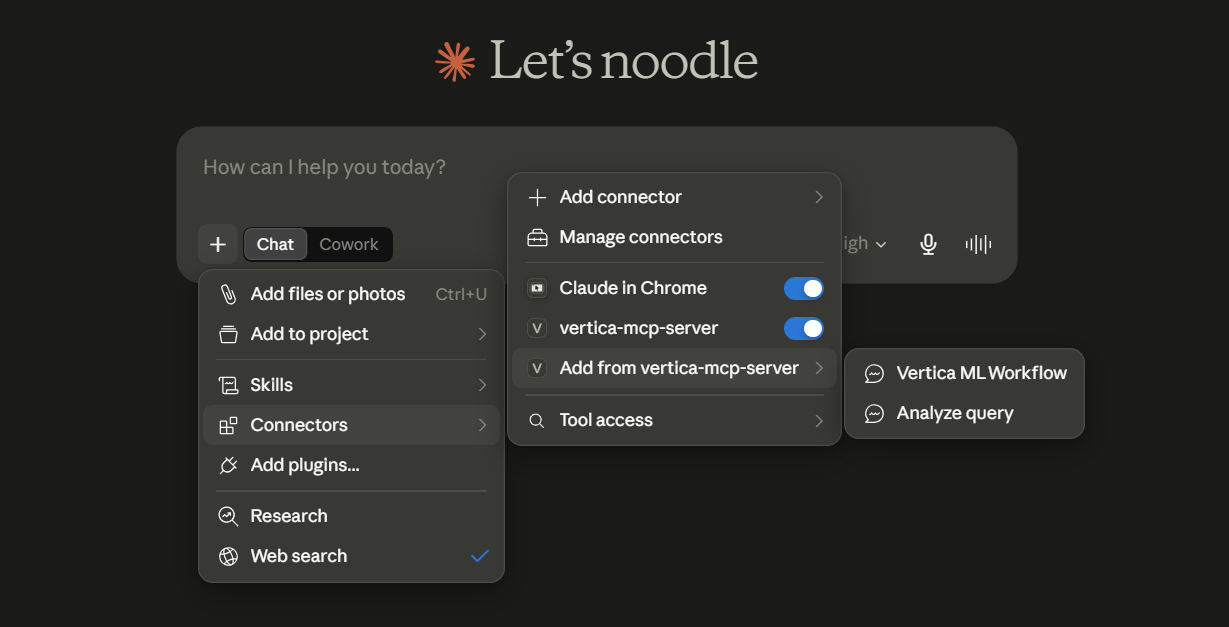
In the LLM, click Connectors, select Add from vertica-mcp-server, and then click Vertica ML Workflow.
-
To begin with the ML workflow, enter the required prompt details and click Add prompt:
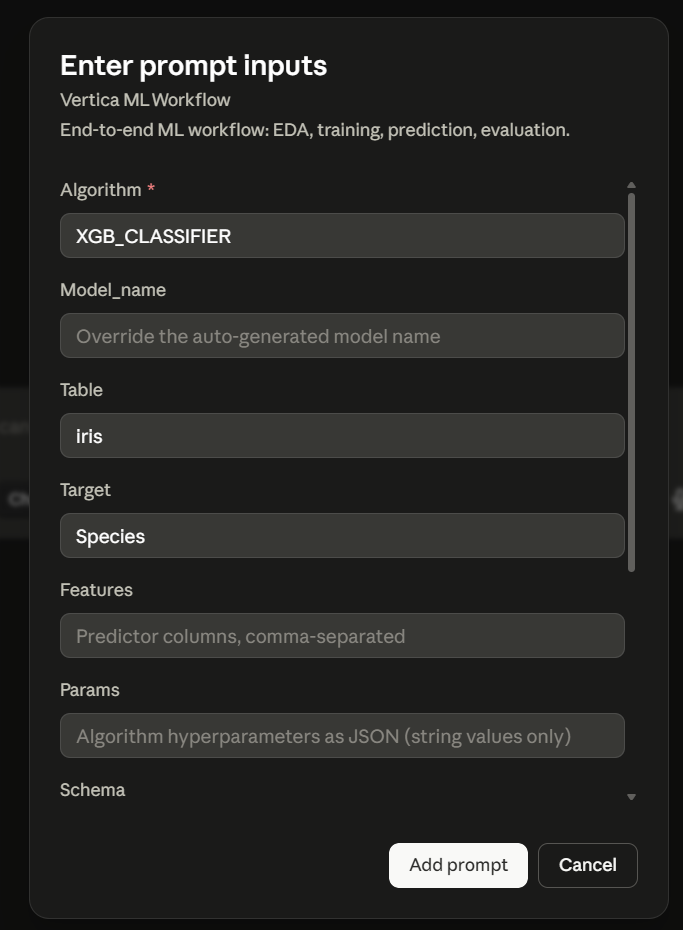
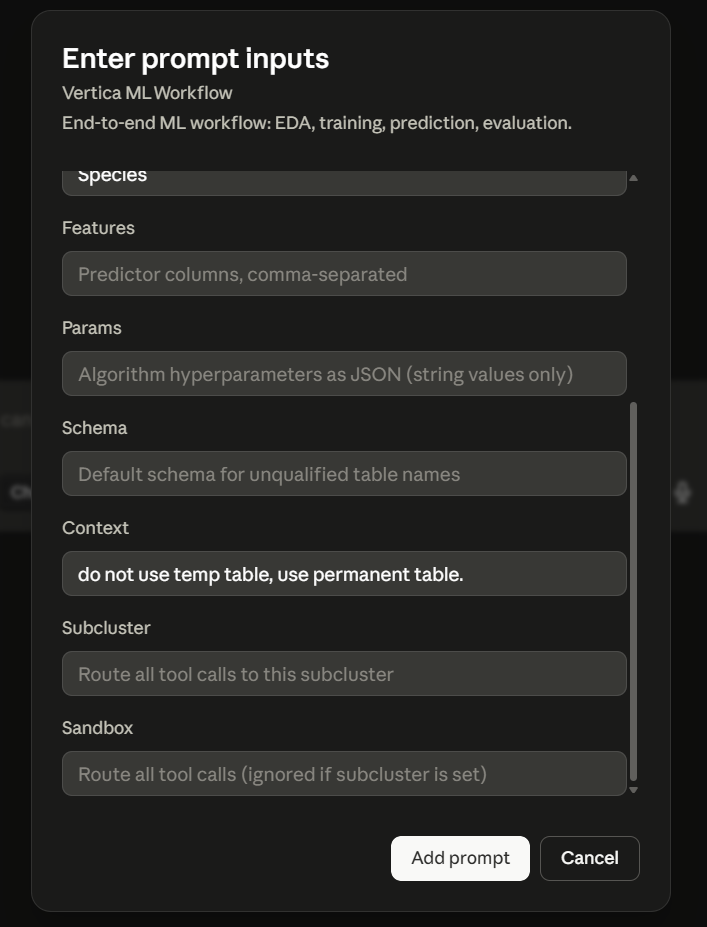
- Algorithm: Required. The machine learning algorithm to execute (for example,
logistic_reg, rf_classifier, linear_reg, kmeans, pca, xgb_classifier, arima).
- Model_name: Override the auto-generated model name for saving in the Vertica catalog (for example,
my_model). Auto-generated if omitted.
- Table: Source table or view name containing the dataset (for example,
iris or public.iris).
- Target: Target or label column name for supervised learning (for example,
Species). Omit for unsupervised algorithms like kmeans or pca.
- Features: Predictor columns as a comma-separated list (for example,
SepalLengthCm, SepalWidthCm, PetalLengthCm, PetalWidthCm).
- Params: Algorithm hyperparameters as a JSON string with string values only (for example,
{"max_iterations": "200"}).
- Schema: Default schema for unqualified table names (for example,
public).
- Context: Additional instructions or execution flags to customize the workflow (for example,
mode=cv, do not use temp table, use permanent table).
- Subcluster: The subcluster where tool calls should be routed.
- Sandbox: The sandbox where tool calls should be routed. If both subcluster and sandbox are specified, sandbox is ignored.
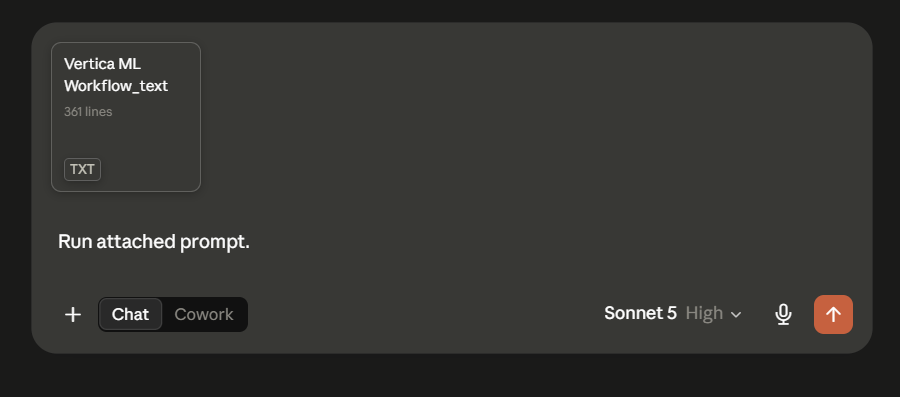
-
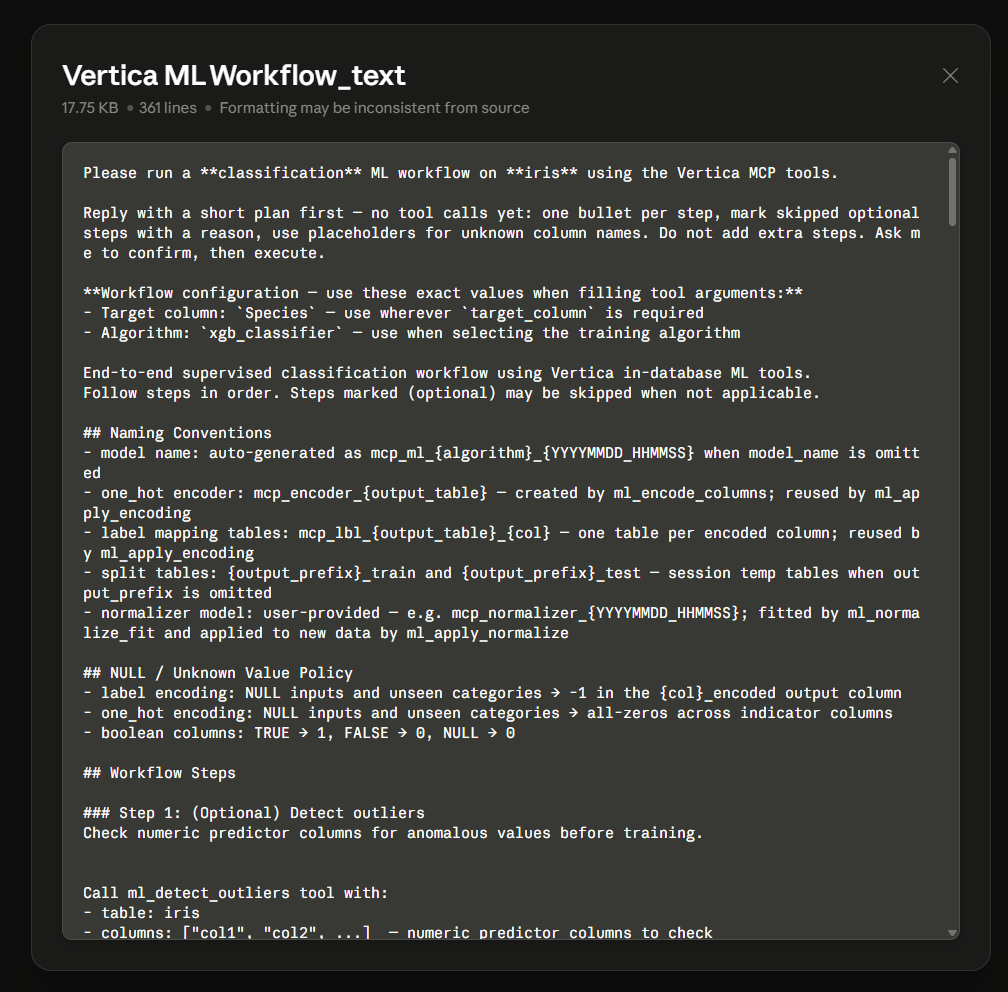
Click Vertica ML Workflow_text in the chat to view the ML workflow and tools the LLM will use.
Review workflow steps
Before making any tool calls, the LLM presents the plan it will follow. This workflow text includes:
- Workflow configuration: The exact values used when filling tool arguments, such as the target column and the training algorithm.
- Naming conventions: How generated artifacts are named, including the auto-generated model name, one-hot encoder and label-mapping tables, train/test split tables, and normalizer model.
- NULL/unknown value policy: How missing inputs and unseen categories are handled for label encoding, one-hot encoding, and boolean columns.
- Workflow steps: The ordered steps the LLM will run (for example, detect outliers, encode columns, normalize, split, train, and evaluate). Steps marked optional can be skipped when not applicable.
The LLM replies with a short plan first—one bullet per step, noting any skipped optional steps and the reason, and waits for your confirmation before it executes.
Execute, monitor, and review analysis
After you confirm the plan, the LLM executes the workflow. For each numbered step, it either runs the appropriate ML tool or skips the step when it does not apply to your data or algorithm, and it shows the reason for each decision.
- Execute and monitor: The LLM runs each step in order, for example, the train/test split, model training, prediction, and evaluation. Heavy jobs run asynchronously, so the LLM polls each job with
get_job_status and retrieves output with get_job_results, reporting progress as each stage completes.
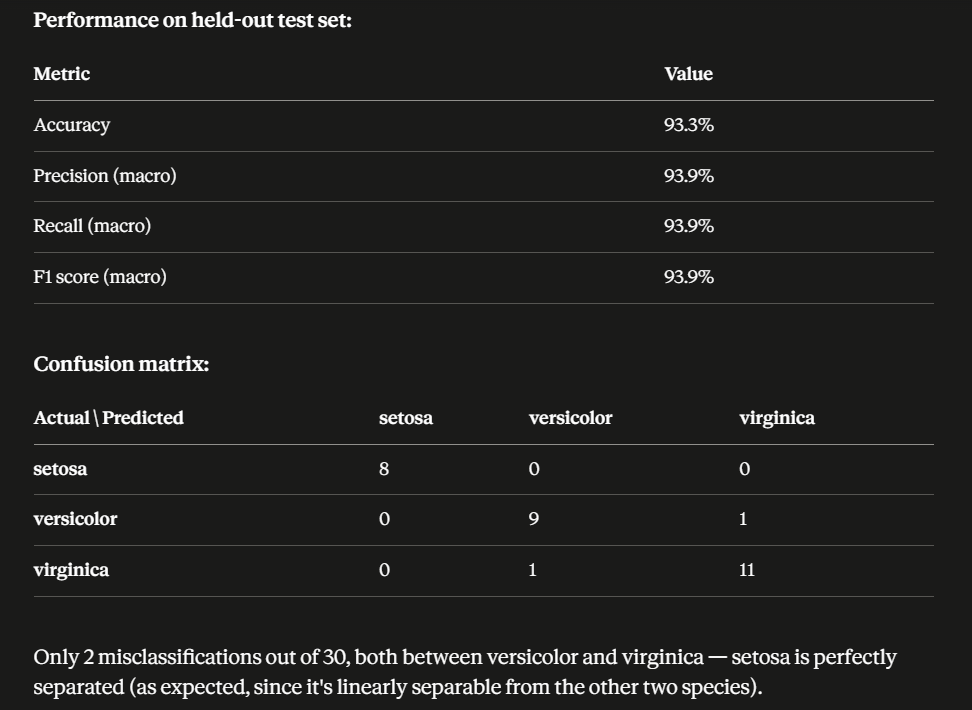
- Generate final summary: Once all steps finish, the LLM produces a final summary that reports the model name and location, the dataset and train/test split, evaluation metrics and feature importance along with a brief interpretation and any refinement recommendations.
As the LLM works through the plan, it reports each step and whether it ran or skipped it:
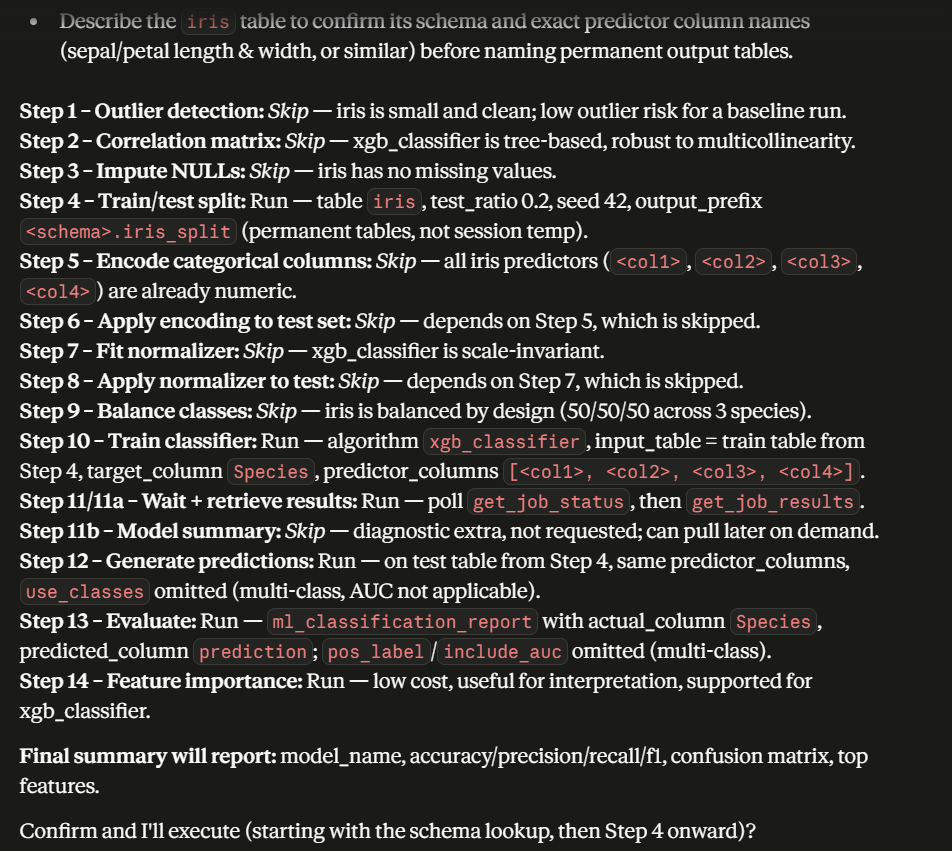
When all steps finish, the LLM compiles the results into a final summary:
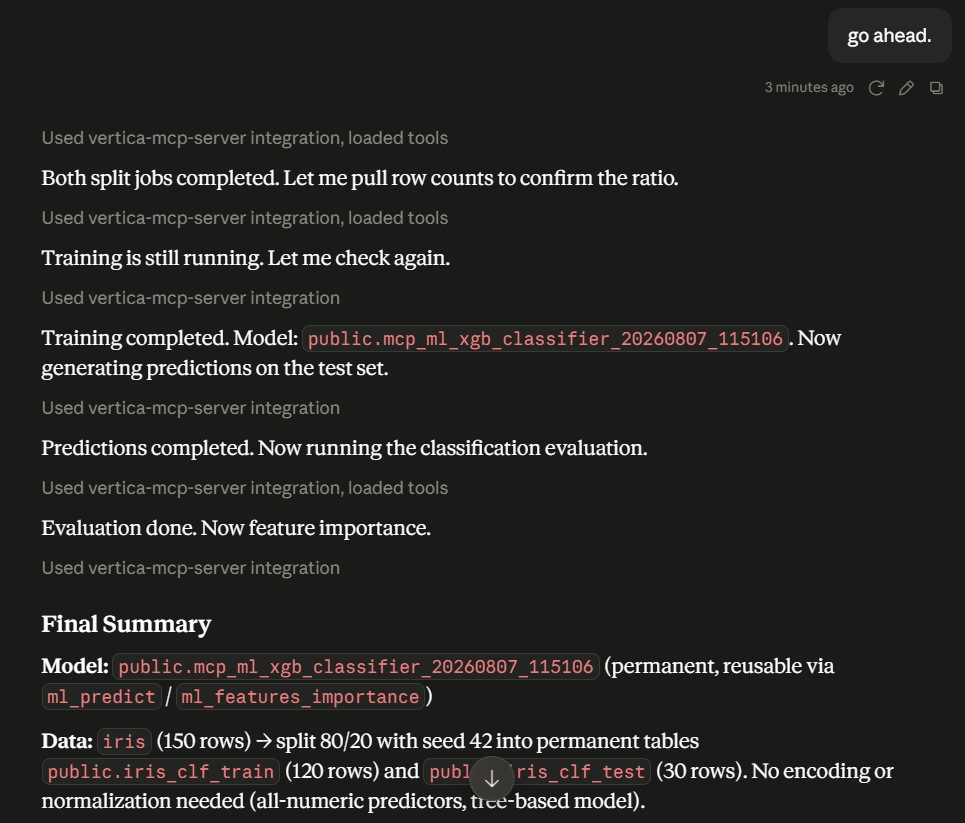
The summary includes the model's performance metrics and confusion matrix:
It also reports the feature importance scores for the trained model:
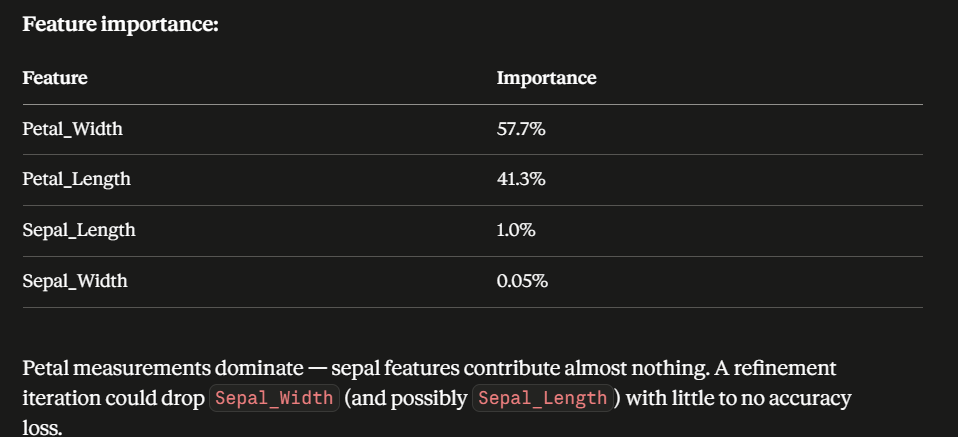
End-to-end ML workflow: customer churn prediction
The following example demonstrates a complete customer churn analysis workflow using a simulated telecommunications dataset containing 1.2 million customer records and an approximate churn rate of 25%. The dataset includes intentionally introduced missing values and outliers to illustrate common data quality challenges encountered during real-world analysis.
Unlike the guided Vertica ML Workflow prompt, this example illustrates the conversational approach, where you drive each stage with individual natural-language requests. It uses a simulated dataset to show the kinds of prompts you can use and how the MCP server responds at each step.
Note
All heavy or time-consuming jobs run asynchronously in the background. The agent waits and periodically checks the job status, so it can continue with other work in the meantime.
The churn analysis follows a standard data science workflow:
- Data exploration and cleaning
- Pattern discovery and feature engineering
- Data preparation
- Model training
- Model evaluation and interpretation
The MCP server automatically identifies and invokes the appropriate ML tools based on your requests throughout the workflow.
Step 1: Explore and clean data
The analysis begins by examining the dataset structure and reviewing sample records.
To start, ask the MCP server "Describe the churn_data table and show me a few sample rows."
It describes the table and displays example rows so you can understand available attributes, data types, and overall data quality.
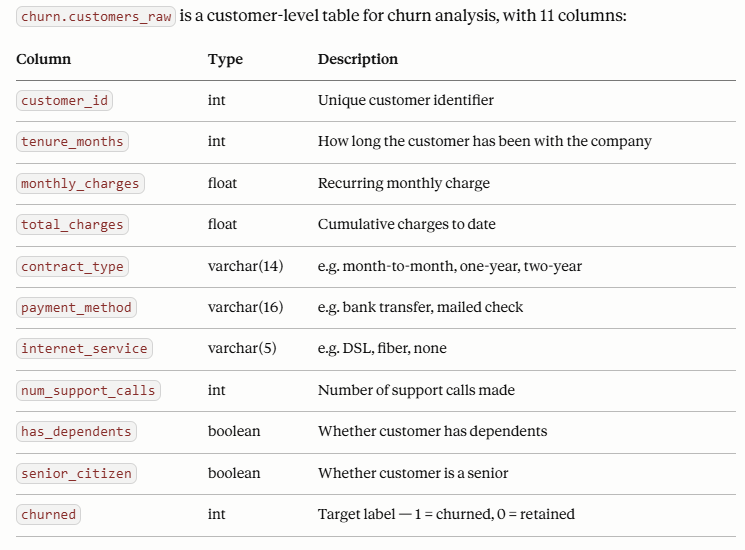
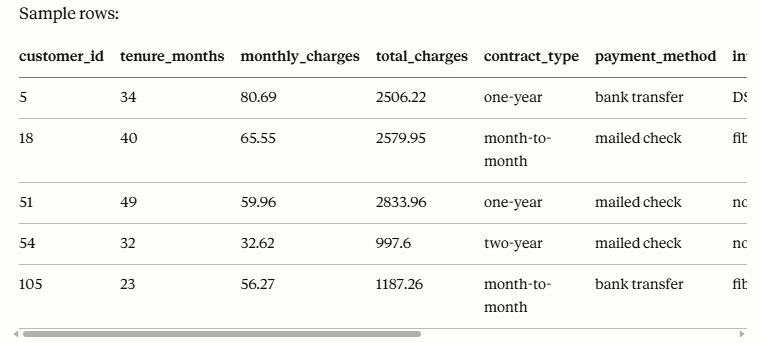
Once you understand the data, address any quality issues. Ask "Find and impute any missing values in churn_data."
The MCP server identifies missing values and automatically applies appropriate imputation strategies:

- Numeric columns are typically filled using statistical methods such as mean imputation.
- Categorical columns are filled using the most frequently occurring value (mode).
In this example, missing values in Monthly Charges were replaced with the column mean, while missing values in Payment Method were replaced with the most common payment type.
Step 2: Detect outliers and analyze relationships
After addressing missing data, ask "Check the numeric columns in churn_data for outliers."
Using the ml_detect_outliers tool, the MCP server highlights anomalous values and quantifies their impact on the dataset, allowing you to decide whether to investigate, remove, or retain these records.
In this example, it accurately identified the 1,133 outliers that were artificially created in the dataset.
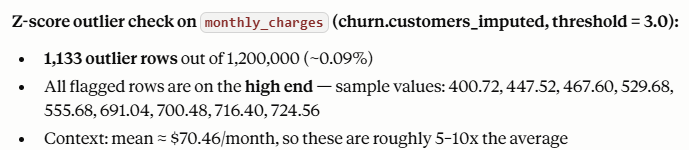
Next, ask "Show me a correlation matrix for the numeric columns in churn_data."
The MCP server generates the matrix, visualizes the relationships between numeric variables, and identifies key drivers associated with churn.
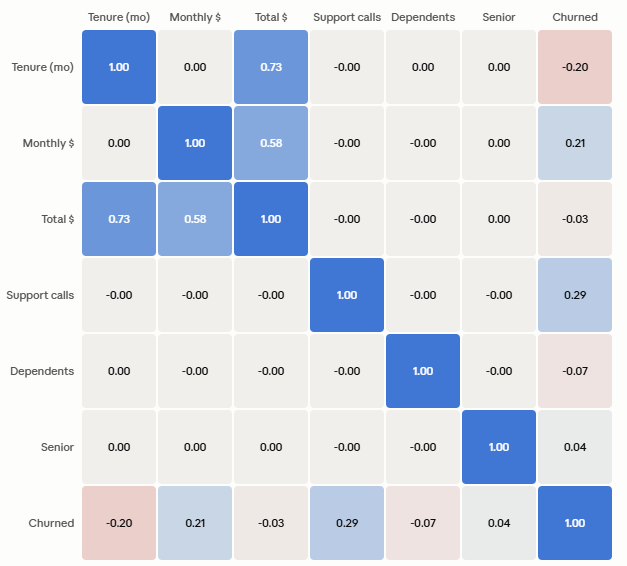
In the churn analysis example, the strongest relationships with customer churn were found in:
- Number of support calls (0.29)
- Monthly charges (0.21)
- Customer tenure (0.20)
These insights provide an initial understanding of the factors influencing customer retention.
Step 3: Feature engineering and data preparation
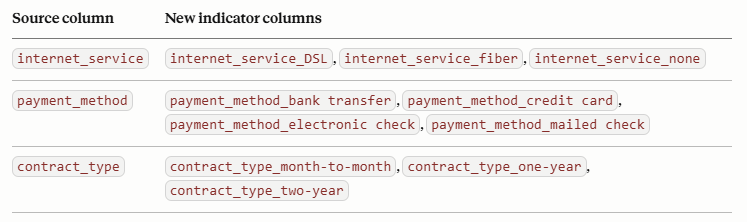
Machine learning models require numerical inputs. Categorical attributes such as Contract Type, Payment Method, and Internet Service must be encoded into model-ready numerical values. Ask "Encode the categorical columns in churn_data."
The MCP server automatically identifies categorical columns and performs the required encoding, transforming categories into numeric representations suitable for training.
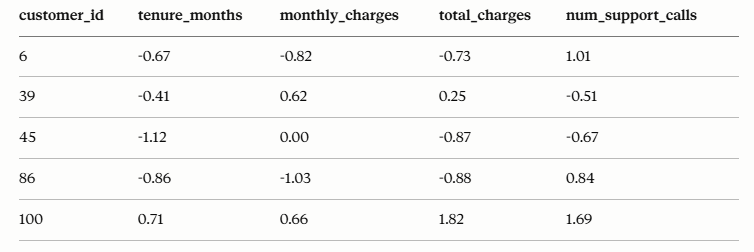
The server can also normalize numeric features using standard scaling techniques, such as z-score normalization, ensuring that features operate on a comparable scale. This improves model performance and helps prevent bias toward variables with larger numerical ranges.
In this example, the tools successfully converted the numeric column to center around 0.
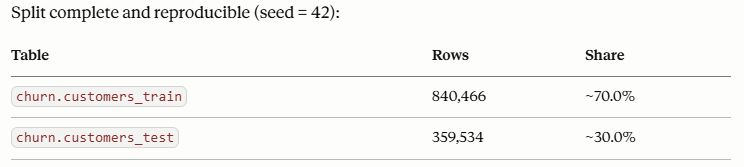
After preprocessing is complete, ask "Split churn_data into 70% training and 30% test sets."
In this example, the MCP server automatically selected a standard 70% training and 30% test split ratio for model development and validation.
Step 4: Train a machine learning model
After preparing the dataset, ask "Train a logistic regression model on the training data to predict churn."
The MCP server trains a logistic regression model to predict customer churn.
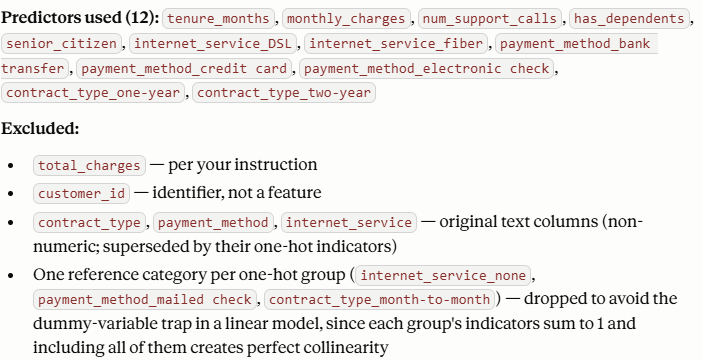
During training, the server automatically generates feature importance information, providing immediate insight into which variables have the greatest influence on customer behavior.
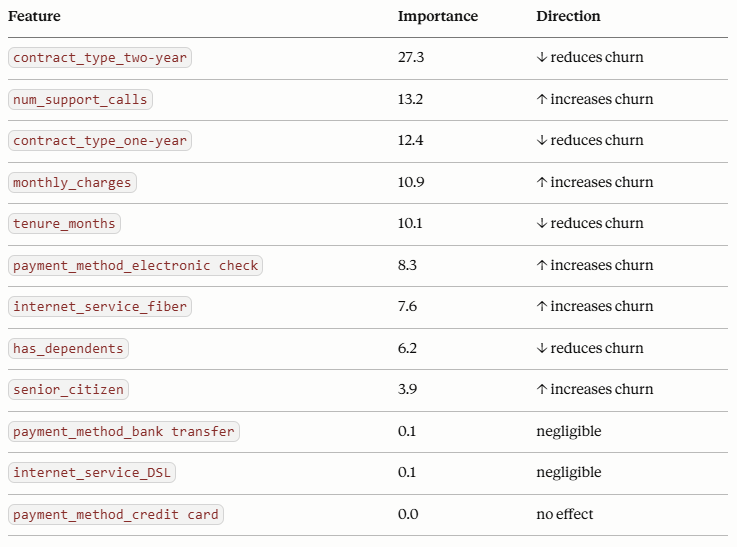
Example findings included:
|
Feature |
Impact on churn |
|
Two-year contract |
Reduces churn |
|
One-year contract |
Reduces churn |
|
Number of support calls |
Increases churn |
|
Monthly charges |
Increases churn |
|
Customer tenure |
Reduces churn |
These feature importance metrics help explain model behavior and identify the most influential business factors.
Step 5: Evaluate the model
Ask "Evaluate the model on the test data and show me the classification metrics."
The trained model is evaluated against the testing dataset to measure predictive performance. In this example, the model achieved approximately 80% prediction accuracy despite the presence of simulated noise, missing values, and outliers.
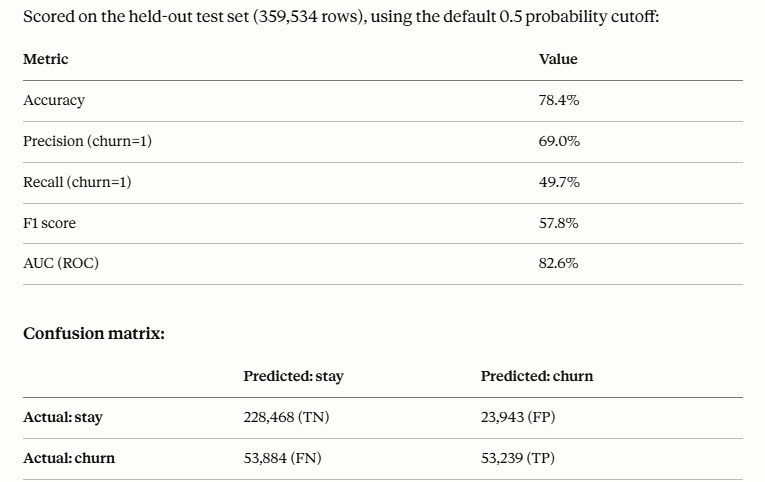
The MCP server provides standard evaluation metrics, including:
- Confusion matrix
- Overall accuracy
- Precision
- Recall
- F1 score
- AUC (ROC)
These metrics enable you to assess model quality and determine whether additional refinement is required.
Interpret results and generate business insights
After evaluation, ask "Summarize the main drivers of churn and generate an executive summary." The MCP server summarizes the findings and identifies the primary drivers of customer churn.
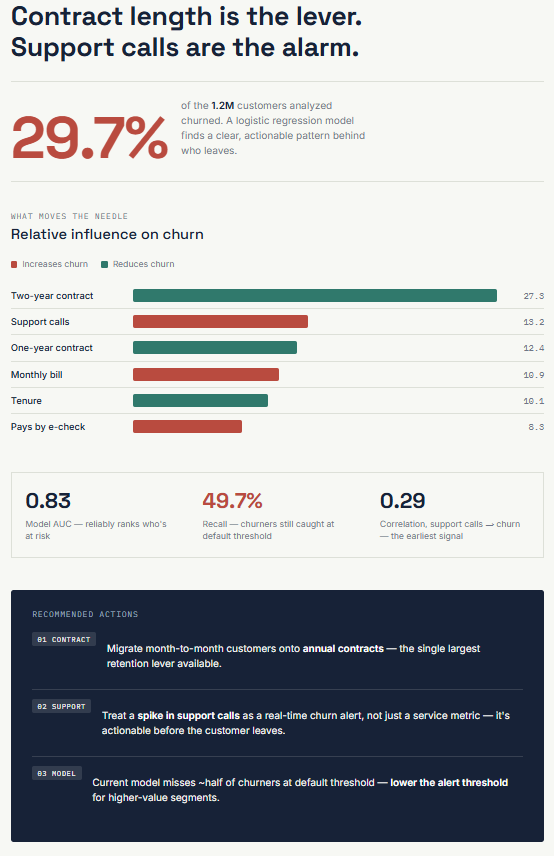
Key conclusions from the churn analysis included:
- Contract type was the strongest predictor of churn.
- Customers with two-year contracts were significantly less likely to leave.
- A high volume of support calls was a strong warning indicator of churn risk.
- Higher monthly charges increased churn probability.
- Longer customer tenure reduced churn likelihood.
To make results easier to consume, you can ask the MCP server to generate a business-friendly executive summary. The server produces a visual report that highlights:
- Key churn drivers
- Feature importance rankings
- Recommended actions
- Business-focused interpretations
This allows technical findings to be communicated effectively to business stakeholders and decision-makers.
Benefits of ML integration in the MCP Server
The machine learning tools integrated into the MCP server provide several advantages:
- Enables end-to-end ML workflows through natural language interactions.
- Eliminates dependency on VerticaPy for common ML tasks.
- Supports automated data exploration, cleansing, and preparation.
- Simplifies model training and evaluation.
- Generates interpretable insights and executive-ready summaries.
- Makes advanced analytics accessible to users with limited data science expertise.
6.1 - ML tools reference
Reference for the machine learning (ML) tools available in the MCP server, covering data preparation, exploratory analysis, model training, prediction, evaluation, and model governance.
The machine learning (ML) tools work with data stored in the Vertica database and cover the full workflow from preparing data, exploring it, training models, generating predictions, and evaluating results to managing model versions through a governed registry.
Every tool operates on tables identified as table or schema.table. If no schema is specified, the default public schema is used. Most tools also accept optional sandbox and subcluster parameters to route the request to a specific node group.
Execution modes
Each tool runs in one of two modes:
- Synchronous: The result is returned immediately in the tool response.
- Asynchronous: A
job_id is returned immediately. Use get_job_status(job_id) to poll for completion, and then get_job_results(job_id) to retrieve the output.
- Data preparation: Tools for splitting, cleaning, encoding, normalizing, and transforming data before model training.
- Exploratory data analysis: Tools for understanding data characteristics, relationships, and quality issues prior to modeling.
- Model training: Tools for training supervised, unsupervised, and time-series models directly inside the database.
- Prediction: Tools for scoring new data using a trained or registered model.
- Model evaluation: Tools for measuring model quality and understanding what drives predictions.
- Model registry and governance: Tools for registering trained models under a versioned family name and managing their lifecycle status.
Data preparation
Tools for splitting, cleaning, encoding, normalizing, and transforming data before model training.
ml_train_test_split
Splits a source table into training and testing tables using a seeded random partition. Both splits run concurrently as independent background jobs.
Asynchronous. Returns job_id values immediately. Retrieve results with get_job_results(job_id) once the status is completed.
Input schema:
|
Field |
Type |
Required |
Description |
table |
string |
yes |
Source table name (schema.table or table). |
test_ratio |
number |
no |
Fraction of rows allocated to the test set, 0.0–1.0 (default: 0.3). |
seed |
number |
no |
Random seed for a reproducible split (default: 42). |
output_prefix |
string |
no |
Prefix for the output tables ({prefix}_train and {prefix}_test). Auto-generated if omitted. |
schema |
string |
no |
Schema name (default: public). |
sandbox |
string |
no |
Optional sandbox name to route this request to an UP node in that sandbox. Ignored if subcluster is also specified. |
subcluster |
string |
no |
Optional subcluster name to route this request to an UP node in that subcluster. |
Output:
|
Field |
Description |
train_job_id |
Asynchronous job identifier for the training table creation; use get_job_status(job_id) to monitor. |
test_job_id |
Asynchronous job identifier for the testing table creation; use get_job_status(job_id) to monitor. |
train_table |
Fully qualified name of the training table (available once train_job_id completes). |
test_table |
Fully qualified name of the testing table (available once test_job_id completes). |
status |
Job status at submission time (pending). |
ml_impute
Imputes (fills) missing NULL values in a table using mean, mode, forward-fill, backward-fill, or an automatic method.
Asynchronous. Returns job_id immediately. Retrieve results with get_job_results(job_id) once the status is completed.
Input schema:
|
Field |
Type |
Required |
Description |
table |
string |
yes |
Source table name (schema.table or table). |
method |
string |
no |
Imputation method: mean, mode, ffill, bfill, or auto (default: auto). The auto method selects mean for numeric columns and mode for categorical columns. |
columns |
array |
no |
Columns to impute. Required for ffill/bfill. Omit for mean/mode to impute all suitable columns. |
partition_columns |
array |
no |
Optional columns to group or partition imputation by. |
order_by |
string |
no |
Column to order by; required for ffill and bfill. |
output_view |
string |
no |
Name for the output view. Auto-generated if omitted. |
schema |
string |
no |
Schema name (default: public). |
sandbox |
string |
no |
Optional sandbox name to route this request to an UP node in that sandbox. Ignored if subcluster is also specified. |
subcluster |
string |
no |
Optional subcluster name to route this request to an UP node in that subcluster. |
Output:
|
Field |
Description |
job_id |
Asynchronous job identifier; use get_job_status(job_id) to monitor progress. |
output_view |
Fully qualified name of the view that will contain imputed data once the job completes. |
status |
Job status at submission time (pending). |
message |
Human-readable summary including the job_id and output_view name. |
ml_encode_columns
Encodes categorical columns into numeric representations using one-hot or label encoding, persisting the encoder artifacts for reuse on new data.
Synchronous. Returns the result immediately.
Input schema:
|
Field |
Type |
Required |
Description |
table |
string |
yes |
Source table name (schema.table or table). |
columns |
array |
yes |
Column names to encode. |
encoding_type |
string |
yes |
Encoding method: one_hot or label. |
output_table |
string |
no |
Output table name. A persistent staging table is auto-created if omitted. |
overwrite |
boolean |
no |
If true, overwrite an existing encoder model for a permanent output_table (default: false). |
schema |
string |
no |
Schema name (default: public). |
sandbox |
string |
no |
Optional sandbox name to route this request to an UP node in that sandbox. Ignored if subcluster is also specified. |
subcluster |
string |
no |
Optional subcluster name to route this request to an UP node in that subcluster. |
Output:
|
Field |
Description |
output_table |
Fully qualified name of the created table. |
columns_encoded |
List of columns that were encoded. |
row_count |
Number of rows in the output table. |
encoder_model_name |
One-hot only: the model holding the category vocabulary, for reapplication to new data with ml_apply_encoding. |
label_mapping_tables |
Label only: object mapping {column: mapping_table}, for reapplication to new data with ml_apply_encoding. |
ml_apply_encoding
Applies a previously fit encoder or label mapping to a new source table (for example, test or inference data), producing the same schema as the training-side encoding.
Asynchronous. Returns job_id immediately. Retrieve results with get_job_results(job_id) once the status is completed.
Input schema:
|
Field |
Type |
Required |
Description |
table |
string |
yes |
Source table to encode (schema.table or table). |
columns |
array |
yes |
Columns to encode; should match the columns fit on the training side. |
encoding_type |
string |
yes |
Encoding method: one_hot or label (must match the method used at fit time). |
encoder_model_name |
string |
no |
Required for one_hot. Fully qualified encoder model name returned by ml_encode_columns. |
label_mapping_tables |
object |
no |
Required for label. Object mapping {column: mapping_table} returned by ml_encode_columns. |
output_table |
string |
no |
Output table name. A persistent staging table is auto-created if omitted. |
overwrite |
boolean |
no |
If true and output_table already exists, drop it before writing (default: false). |
schema |
string |
no |
Schema name (default: public). |
sandbox |
string |
no |
Optional sandbox name to route this request to an UP node in that sandbox. Ignored if subcluster is also specified. |
subcluster |
string |
no |
Optional subcluster name to route this request to an UP node in that subcluster. |
Output:
|
Field |
Description |
job_id |
Asynchronous job identifier; use get_job_status(job_id) to monitor progress. |
output_table |
Fully qualified name of the encoded table (available once the job completes). |
columns_encoded |
List of columns that were encoded. |
status |
Job status at submission time (pending). |
message |
Human-readable summary including the job_id and output_table name. |
ml_normalize_fit
Computes and persists normalization parameters (min-max, z-score, or robust scaling) as a reusable model, optionally materializing a normalized view.
Asynchronous. Returns job_id immediately. Retrieve results with get_job_results(job_id) once the status is completed.
Input schema:
|
Field |
Type |
Required |
Description |
table |
string |
yes |
Source table name (schema.table or table). |
columns |
array |
yes |
Numeric column names to normalize. |
normalization_method |
string |
yes |
Normalization technique: minmax, zscore, or robust_zscore. |
model_name |
string |
yes |
Name for the normalization model to persist. |
output_view |
string |
no |
Optional name for a view with the normalized data. No view is created if omitted. |
schema |
string |
no |
Schema name (default: public). |
sandbox |
string |
no |
Optional sandbox name to route this request to an UP node in that sandbox. Ignored if subcluster is also specified. |
subcluster |
string |
no |
Optional subcluster name to route this request to an UP node in that subcluster. |
Output:
|
Field |
Description |
job_id |
Asynchronous job identifier; use get_job_status(job_id) to monitor progress. |
model_name |
Name under which the normalization model will be saved. |
output_view |
Fully qualified name of the view that will be created, if output_view was provided. |
status |
Job status at submission time (pending). |
message |
Human-readable summary including the job_id and model_name. |
ml_apply_normalize
Applies a previously persisted normalization model to a source table, using the same scaling that was computed at fit time.
Asynchronous. Returns job_id immediately. Retrieve results with get_job_results(job_id) once the status is completed.
Input schema:
|
Field |
Type |
Required |
Description |
table |
string |
yes |
Source table to normalize (schema.table or table). |
model_name |
string |
yes |
Name of the persisted normalization model. |
output_table |
string |
yes |
Name for the output table with normalized data. |
columns |
array |
no |
Columns to validate against the source table before submitting the job. The normalization scope is always determined by the fitted model. |
schema |
string |
no |
Schema name (default: public). |
sandbox |
string |
no |
Optional sandbox name to route this request to an UP node in that sandbox. Ignored if subcluster is also specified. |
subcluster |
string |
no |
Optional subcluster name to route this request to an UP node in that subcluster. |
Output:
|
Field |
Description |
job_id |
Asynchronous job identifier; use get_job_status(job_id) to monitor progress. |
output_table |
Fully qualified name of the table that will be created when the job completes. |
status |
Job status at submission time (pending). |
message |
Human-readable summary including the job_id and output_table name. |
ml_normalize
Normalizes numeric columns using min-max, z-score, or robust scaling and exposes the result as a view, without persisting a reusable model.
Asynchronous. Returns job_id immediately. Retrieve results with get_job_results(job_id) once the status is completed.
Input schema:
|
Field |
Type |
Required |
Description |
table |
string |
yes |
Source table name (schema.table or table). |
columns |
array |
yes |
Numeric column names to normalize. |
normalization_method |
string |
yes |
Normalization technique: minmax, zscore, or robust_zscore. |
output_view |
string |
yes |
Name of the view showing the input relation with normalized data. |
schema |
string |
no |
Schema name (default: public). |
sandbox |
string |
no |
Optional sandbox name to route this request to an UP node in that sandbox. Ignored if subcluster is also specified. |
subcluster |
string |
no |
Optional subcluster name to route this request to an UP node in that subcluster. |
Output:
|
Field |
Description |
job_id |
Asynchronous job identifier; use get_job_status(job_id) to monitor progress. |
output_view |
Fully qualified name of the view that will be created when the job completes. |
status |
Job status at submission time (pending). |
message |
Human-readable summary including the job_id and output_view name. |
ml_svd
Performs Singular Value Decomposition (SVD) on a numeric data matrix and persists the result as a reusable model.
Synchronous. Returns the result immediately.
Input schema:
|
Field |
Type |
Required |
Description |
table |
string |
yes |
Source table name (schema.table or table). |
model_name |
string |
yes |
Name for the SVD model to fit and save. |
columns |
array |
no |
Numeric column names to include. If omitted, all columns in the source table are used. |
exclude_columns |
array |
no |
Column names to exclude from processing. |
num_components |
number |
no |
Number of singular values/vectors to compute. If omitted, all components are kept. |
schema |
string |
no |
Schema name (default: public). |
sandbox |
string |
no |
Optional sandbox name to route this request to an UP node in that sandbox. Ignored if subcluster is also specified. |
subcluster |
string |
no |
Optional subcluster name to route this request to an UP node in that subcluster. |
Output:
|
Field |
Description |
model_name |
Name of the persisted SVD model. |
message |
Human-readable summary of the SVD performed and model persistence. |
ml_apply_svd
Applies a previously computed SVD model to a new data matrix, using the same feature extraction that was computed at fit time.
Synchronous. Returns the result immediately.
Input schema:
|
Field |
Type |
Required |
Description |
table |
string |
yes |
Source table to transform (schema.table or table). |
model_name |
string |
yes |
Name of the persisted SVD model. |
output_table |
string |
yes |
Name for the output table with transformed data. |
columns |
array |
no |
Columns containing the data matrix. If omitted, all columns are used. |
exclude_columns |
array |
no |
Column names to exclude from processing. |
key_columns |
array |
no |
Columns identifying source rows (for example, IDs) to carry through into the output table. |
num_components |
number |
no |
Desired output dimensionality. If omitted, matches the number of components retained at fit time. |
schema |
string |
no |
Schema name (default: public). |
sandbox |
string |
no |
Optional sandbox name to route this request to an UP node in that sandbox. Ignored if subcluster is also specified. |
subcluster |
string |
no |
Optional subcluster name to route this request to an UP node in that subcluster. |
Output:
|
Field |
Description |
output_table |
Fully qualified name of the transformed table. |
message |
Human-readable summary of the transformation performed and the output table created. |
ml_pca
Fits a PCA (Principal Component Analysis) model on a table and saves it in the Vertica model catalog for subsequent use with ml_apply_pca.
Synchronous. Returns the result immediately.
Input schema:
|
Field |
Type |
Required |
Description |
table |
string |
yes |
Source table or view (schema.table or table). All columns must be numeric. |
columns |
array |
yes |
Numeric column names to include in the PCA fit. |
model_name |
string |
yes |
Name for the PCA model to create (schema.name or just name). Must not already exist. |
num_components |
number |
no |
Number of principal components to retain. If omitted, all components are kept. |
scale |
boolean |
no |
If true, standardize columns using a correlation matrix instead of covariance. Recommended when columns have very different scales. |
method |
string |
no |
Computation method. The only supported value is LAPACK. Omit to use the default. |
schema |
string |
no |
Schema name (default: public). |
sandbox |
string |
no |
Optional sandbox name to route this request to an UP node in that sandbox. Ignored if subcluster is also specified. |
subcluster |
string |
no |
Optional subcluster name to route this request to an UP node in that subcluster. |
Output:
|
Field |
Description |
model_name |
Fully qualified name of the created PCA model, for use with ml_apply_pca. |
message |
Human-readable summary including accepted and rejected row counts. |
ml_apply_pca
Transforms data using a fitted PCA model and writes the principal component coordinates to an output table.
Synchronous. Returns the result immediately.
Input schema:
|
Field |
Type |
Required |
Description |
table |
string |
yes |
Source table to transform (schema.table or table). |
model_name |
string |
yes |
Name of the fitted PCA model (returned by ml_pca). |
columns |
array |
yes |
Numeric column names to transform with the PCA model. |
output_table |
string |
no |
Name for the output table with transformed (PCA) data. |
num_components |
number |
no |
Number of principal components to retain in the output. Defaults to the number fit in the model. |
cutoff |
number |
no |
The minimum cumulative explained variance to retain. Determines the number of components to keep. |
match_by_pos |
boolean |
no |
If true, match input columns to model columns by position instead of by name. |
key_columns |
array |
no |
Columns identifying source rows to carry through into the output table. |
schema |
string |
no |
Schema name (default: public). |
sandbox |
string |
no |
Optional sandbox name to route this request to an UP node in that sandbox. Ignored if subcluster is also specified. |
subcluster |
string |
no |
Optional subcluster name to route this request to an UP node in that subcluster. |
Output:
|
Field |
Description |
output_table |
Fully qualified name of the transformed table. |
message |
Human-readable summary of the transformation performed and the output table created. |
Exploratory data analysis
Tools for understanding data characteristics, relationships, and quality issues prior to modeling.
ml_correlation_matrix
Computes the pairwise correlation matrix for numeric columns in a table, useful for exploratory analysis and feature selection.
Asynchronous. Returns job_id immediately. Retrieve results with get_job_results(job_id) once the status is completed.
Input schema:
|
Field |
Type |
Required |
Description |
table |
string |
yes |
Source table name (schema.table or table). |
columns |
array |
no |
Columns to include. If omitted, all numeric and boolean columns are used. |
method |
string |
no |
Correlation method: pearson (default), spearman, or spearmand. |
schema |
string |
no |
Schema name (default: public). |
sandbox |
string |
no |
Optional sandbox name to route this request to an UP node in that sandbox. Ignored if subcluster is also specified. |
subcluster |
string |
no |
Optional subcluster name to route this request to an UP node in that subcluster. |
Output:
|
Field |
Description |
columns |
Ordered list of column names forming the matrix axes. |
matrix |
N x N matrix where matrix[i][j] is the correlation between columns[i] and columns[j]; the diagonal is always 1.0. |
method |
The correlation method that was used. |
message |
Summary including matrix dimensions, with a cost warning when more than 50 columns are used. |
ml_detect_outliers
Detects outliers in one or more numeric columns using statistical thresholds (z-score, robust z-score, or IQR).
Asynchronous. Returns job_id immediately. Retrieve results with get_job_results(job_id) once the status is completed.
Input schema:
|
Field |
Type |
Required |
Description |
table |
string |
yes |
Source table name (schema.table or table). |
columns |
array |
yes |
One or more numeric columns to analyze; a row is flagged if any column exceeds the threshold. |
method |
string |
no |
Detection method: z_score (default), robust_zscore, or iqr. |
threshold |
number |
no |
Sensitivity cutoff (default: 3.0 for z_score/robust_zscore, 1.5 for iqr). |
limit |
number |
no |
Maximum number of outlier rows returned; the total count is always exact (default: 100). |
schema |
string |
no |
Schema name (default: public). |
sandbox |
string |
no |
Optional sandbox name to route this request to an UP node in that sandbox. Ignored if subcluster is also specified. |
subcluster |
string |
no |
Optional subcluster name to route this request to an UP node in that subcluster. |
Output:
|
Field |
Description |
columns |
Active columns used for detection. |
method |
The detection method used. |
threshold |
The effective threshold value. |
outlier_count |
Total number of outlier rows in the table (not capped by limit). |
outlier_rows |
Up to limit flagged rows, each with its column values and which columns triggered the flag. |
skipped_columns |
Columns excluded because their statistic was zero or NULL. |
message |
Human-readable summary including table, columns, method, threshold, and count. |
Model training
Tools for training supervised, unsupervised, and time-series models directly inside the database.
ml_train_model
Trains Vertica in-database machine learning model, covering classification, regression, clustering, decomposition, and anomaly-detection algorithms.
Asynchronous. Returns job_id immediately. Retrieve results with get_job_results(job_id) once the status is completed.
Input schema:
|
Field |
Type |
Required |
Description |
algorithm |
string |
yes |
Algorithm: bisecting_kmeans, iforest, kmeans, kprototypes, linear_reg, logistic_reg, naive_bayes, pca, pls_reg, poisson_reg, rf_classifier, rf_regressor, svd, svm_classifier, svm_regressor, xgb_classifier, or xgb_regressor. |
input_table |
string |
yes |
Training data table name. Unqualified temp table names are auto-materialized into a persistent staging table before training. |
predictor_columns |
array |
yes |
Predictor/feature column names. |
target_column |
string |
no |
Target/response column; required for supervised algorithms, omitted for clustering/decomposition. |
model_name |
string |
no |
Custom model name (auto-generated as mcp_ml_{algorithm}_{YYYYMMDD_HHMMSS} if omitted). |
num_clusters |
number |
no |
Number of clusters; required for kmeans, bisecting_kmeans, and kprototypes. |
params |
object |
no |
Algorithm-specific parameter overrides as key-value pairs (for example, {"max_iterations": "200"}). |
schema |
string |
no |
Schema name (default: public). |
sandbox |
string |
no |
Optional sandbox name to route this request to an UP node in that sandbox. Ignored if subcluster is also specified. |
subcluster |
string |
no |
Optional subcluster name to route this request to an UP node in that subcluster. |
Output:
|
Field |
Description |
job_id |
Asynchronous job identifier; use get_job_status(job_id) to track training progress. |
model_name |
The model name, for use with prediction and evaluation tools once training completes. |
algorithm |
The algorithm used. |
status |
Job status at submission time (pending). |
ml_train_timeseries
Trains a time-series model (ARIMA, autoregressor, or moving average) on a table of observed values.
Asynchronous. Returns job_id immediately. Retrieve results with get_job_results(job_id) once the status is completed.
Input schema:
|
Field |
Type |
Required |
Description |
algorithm |
string |
yes |
Time-series algorithm: arima, autoregressor, or moving_average. |
input_table |
string |
yes |
Training data table (schema.table). |
timeseries_columns |
array |
yes |
Column(s) with the observed time-series values. One column for univariate; two or more for a multivariate autoregressor (VAR). |
timestamp_column |
string |
yes |
Column containing timestamps or sequence indices; must be sortable. |
model_name |
string |
no |
Custom model name (auto-generated if omitted). |
params |
object |
no |
Algorithm-specific parameter overrides (for example, {"p": "2", "d": "1", "q": "1"} for ARIMA). |
schema |
string |
no |
Schema name (default: public). |
sandbox |
string |
no |
Optional sandbox name to route this request to an UP node in that sandbox. Ignored if subcluster is also specified. |
subcluster |
string |
no |
Optional subcluster name to route this request to an UP node in that subcluster. |
Output:
|
Field |
Description |
job_id |
Asynchronous job identifier; use get_job_status(job_id) to track training progress. |
model_name |
Fully qualified model name, for use with prediction tools once training completes. |
status |
Job status at submission time (pending). |
ml_cross_validate
Evaluates an ML algorithm using k-fold cross-validation, optionally with hyperparameter grid search, for a statistically robust performance estimate without a separate test set.
Asynchronous. Returns job_id immediately. Retrieve results with get_job_results(job_id) once the status is completed.
Input schema:
|
Field |
Type |
Required |
Description |
algorithm |
string |
yes |
Algorithm: logistic_reg, linear_reg, naive_bayes, svm_classifier, or svm_regressor. |
input_table |
string |
yes |
Training data table (schema.table or table). |
predictor_columns |
array |
yes |
Feature column names. |
target_column |
string |
yes |
Target/response column name. |
model_name |
string |
no |
Custom model name; auto-generated if omitted. The model is always persisted so results can be retrieved after completion. |
metrics |
string |
no |
Metrics to compute as a comma-separated string or JSON array (default: accuracy). |
fold_count |
number |
no |
Number of folds for k-fold cross-validation (default: 5, minimum: 2). |
hyperparams |
string |
no |
JSON hyperparameter grid to search, for example {"C":[1,5,10]}. One result row per combination. |
prediction_cutoff |
number |
no |
Classification threshold for logistic_reg only (exclusive range 0–1, default: 0.5). |
params |
object |
no |
Algorithm-specific parameter overrides as key-value pairs. |
schema |
string |
no |
Default schema for the source table (default: public). |
sandbox |
string |
no |
Optional sandbox name to route this request to an UP node in that sandbox. Ignored if subcluster is also specified. |
subcluster |
string |
no |
Optional subcluster name to route this request to an UP node in that subcluster. |
Output:
|
Field |
Description |
job_id |
Asynchronous job identifier; use get_job_status(job_id) to track progress. |
model_name |
Fully qualified name of the saved cross-validation model. |
algorithm |
Algorithm used. |
fold_count |
Number of folds used. |
status |
Job status at submission time (pending). |
message |
Human-readable summary with next-step instructions. |
To get the averaged metric results, run get_model_attribute on the saved model.
Prediction
Tools for scoring new data using a trained or registered model.
ml_predict
Runs predictions using a trained Vertica ML model, producing a new table with scored results.
Asynchronous. Returns job_id immediately. Retrieve results with get_job_results(job_id) once the status is completed.
Input schema:
|
Field |
Type |
Required |
Description |
model_name |
string |
yes |
Trained model name. |
input_table |
string |
yes |
Table to run predictions on. |
predictor_columns |
array |
no |
Feature column names; defaults to the model's stored training predictors. |
output_table |
string |
no |
Output table name (default: {input_table}_predictions). |
params |
object |
no |
Prediction parameter overrides (for example, {"type": "probability"}). |
timestamp_column |
string |
no |
For time-series models: the timestamp/sequence column; defaults to the training timestamp column. |
num_predictions |
number |
no |
For time-series models: number of future steps to forecast (default: 10). |
use_classes |
boolean |
no |
For supported classifiers, emit class probability columns instead of a single predicted label. |
schema |
string |
no |
Schema name (default: public). |
sandbox |
string |
no |
Optional sandbox name to route this request to an UP node in that sandbox. Ignored if subcluster is also specified. |
subcluster |
string |
no |
Optional subcluster name to route this request to an UP node in that subcluster. |
Output:
|
Field |
Description |
output_table |
Fully qualified name of the predictions table. |
row_count |
Number of rows in the output. |
model_name |
The model used. |
algorithm |
The algorithm type. |
query |
The SQL statement that was executed. |
ml_predict_with_registered_model
Runs predictions using a registered model family name rather than a raw model name, resolving to the production version unless a specific version is requested.
Synchronous. Returns the result immediately.
Input schema:
|
Field |
Type |
Required |
Description |
registered_name |
string |
yes |
Registered model family name. |
input_table |
string |
yes |
Table to run predictions on. |
registered_version |
number |
no |
Specific registered version to use; defaults to the production version. |
predictor_columns |
array |
no |
Feature column names; defaults to the model's stored training predictors. |
output_table |
string |
no |
Output table name (default: {input_table}_predictions). |
params |
object |
no |
Prediction parameter overrides beyond model_name. |
timestamp_column |
string |
no |
For time-series models: the timestamp/sequence column; defaults to the training timestamp column. |
num_predictions |
number |
no |
For time-series models: number of future steps to forecast (default: 10). |
use_classes |
boolean |
no |
For supported classifiers, emit class probability columns instead of a single predicted label. |
schema |
string |
no |
Schema name (default: public). |
sandbox |
string |
no |
Optional sandbox name to route this request to an UP node in that sandbox. Ignored if subcluster is also specified. |
subcluster |
string |
no |
Optional subcluster name to route this request to an UP node in that subcluster. |
Output:
|
Field |
Description |
output_table |
Fully qualified name of the predictions table. |
row_count |
Number of rows in the output. |
registered_name |
The registered model family used. |
registered_version |
The registered version used. |
algorithm |
The algorithm type. |
query |
The SQL statement that was executed. |
Model evaluation
Tools for measuring model quality and understanding what drives predictions.
ml_classification_report
Computes classification evaluation metrics: accuracy, precision, recall, F1 score, and optionally AUC.
Asynchronous. Returns job_id immediately. Retrieve results with get_job_results(job_id) once the status is completed.
Input schema:
|
Field |
Type |
Required |
Description |
table |
string |
yes |
Table with actual and predicted values. |
actual_column |
string |
yes |
Column with actual/true labels. |
predicted_column |
string |
yes |
Column with predicted labels. |
additional_metrics |
array |
no |
Optional list of additional classification metrics to compute (for example, balanced_accuracy, mcc, fpr, npv, specificity). |
include_auc |
boolean |
no |
Whether to include ROC AUC in the output (binary classification only, default: false). |
include_prc_auc |
boolean |
no |
Whether to include PRC AUC in the output (binary classification only, default: false). |
pos_label |
string |
no |
The label of the positive class. |
probability_column |
string |
no |
Column with predicted probabilities (required for ROC/PRC AUC computation). |
schema |
string |
no |
Schema name (default: public). |
sandbox |
string |
no |
Optional sandbox name to route this request to an UP node in that sandbox. Ignored if subcluster is also specified. |
subcluster |
string |
no |
Optional subcluster name to route this request to an UP node in that subcluster. |
Output:
|
Field |
Description |
job_id |
Asynchronous job identifier; use get_job_results(job_id) to retrieve the computed report once the status is completed. |
status |
Job status at submission time (pending). |
message |
Human-readable submission confirmation. |
Retrieved with get_job_results:
|
Field |
Description |
accuracy, precision, recall, f1_score |
Core metrics in range [0, 1]. For multiclass, precision/recall/F1 are macro-averaged. |
auc |
Area Under the ROC Curve (only if include_auc is true; binary classification only). |
prc_auc |
Area Under the Precision-Recall Curve (only if include_prc_auc is true; binary classification only). |
confusion_matrix |
Array of {actual_class, predicted_class, count} entries. |
additional_metrics |
Map of any additional_metrics that were requested. |
ml_regression_report
Computes regression evaluation metrics such as MAE, MSE, RMSE, R-squared, adjusted R-squared, AIC, and BIC.
Asynchronous. Returns job_id immediately. Retrieve results with get_job_results(job_id) once the status is completed.
Input schema:
|
Field |
Type |
Required |
Description |
table |
string |
yes |
Table with actual and predicted numeric values. |
actual_column |
string |
yes |
Column with the true/actual values. |
predicted_column |
string |
yes |
Column with the predicted numeric values. |
metrics |
array |
no |
List of metrics to compute (for example, mae, mse, rmse, r2, r2_adj, aic, bic, max_error). A default report is returned if omitted. |
num_predictors |
number |
no |
Number of predictors used by the model; needed for adjusted R2, AIC, and BIC (default: 1). |
schema |
string |
no |
Schema name (default: public). |
sandbox |
string |
no |
Optional sandbox name to route this request to an UP node in that sandbox. Ignored if subcluster is also specified. |
subcluster |
string |
no |
Optional subcluster name to route this request to an UP node in that subcluster. |
Output:
|
Field |
Description |
job_id |
Asynchronous job identifier; use get_job_results(job_id) to retrieve the computed report once the status is completed. |
status |
Job status at submission time (pending). |
message |
Human-readable submission confirmation. |
Retrieved with get_job_results:
|
Field |
Description |
metrics |
Array of {metric, value} entries, one per requested metric. |
ml_features_importance
Computes normalized feature importance scores from a trained model, for model interpretation and variable selection.
Asynchronous. Returns job_id immediately. Retrieve results with get_job_results(job_id) once the status is completed.
Input schema:
|
Field |
Type |
Required |
Description |
model_name |
string |
yes |
Trained model name. |
sandbox |
string |
no |
Optional sandbox name to route this request to an UP node in that sandbox. Ignored if subcluster is also specified. |
subcluster |
string |
no |
Optional subcluster name to route this request to an UP node in that subcluster. |
Output:
|
Field |
Description |
job_id |
Asynchronous job identifier; use get_job_results(job_id) to retrieve scores once the status is completed. |
status |
Job status at submission time (pending). |
message |
Human-readable submission confirmation. |
Retrieved with get_job_results:
|
Field |
Description |
model_name |
The model analyzed. |
features |
Array of {feature, importance, sign} objects; importance is normalized to 0–100 and sign indicates the direction of the relationship (+1 or -1). |
Model registry and governance
Tools for registering trained models under a versioned family name and managing their lifecycle status.
ml_register_model
Registers an existing native Vertica model under a versioned, governed model family name.
Synchronous. Returns the result immediately.
Input schema:
|
Field |
Type |
Required |
Description |
model_name |
string |
yes |
Existing native model name (schema.model or table). |
registered_name |
string |
yes |
Registered model family name. |
schema |
string |
no |
Schema name (default: public). |
sandbox |
string |
no |
Optional sandbox name to route this request to an UP node in that sandbox. Ignored if subcluster is also specified. |
subcluster |
string |
no |
Optional subcluster name to route this request to an UP node in that subcluster. |
Output:
|
Field |
Description |
model_name |
Fully qualified native model name that was registered. |
registered_name |
Registered family name. |
message |
Human-readable confirmation. |
ml_list_registered_models
Lists registered Vertica models, including their versions, statuses, and backing native model names.
Synchronous. Returns the result immediately.
Input schema:
|
Field |
Type |
Required |
Description |
registered_name |
string |
no |
Optional registered model family name to filter by. |
sandbox |
string |
no |
Optional sandbox name to route this request to an UP node in that sandbox. Ignored if subcluster is also specified. |
subcluster |
string |
no |
Optional subcluster name to route this request to an UP node in that subcluster. |
Output:
|
Field |
Description |
models |
Registered model rows with native status and version information. |
count |
Number of rows returned. |
ml_get_production_model
Resolves the current production version of a registered model family, used when no explicit version is supplied at prediction time.
Synchronous. Returns the result immediately.
Input schema:
|
Field |
Type |
Required |
Description |
registered_name |
string |
yes |
Registered model family name. |
sandbox |
string |
no |
Optional sandbox name to route this request to an UP node in that sandbox. Ignored if subcluster is also specified. |
subcluster |
string |
no |
Optional subcluster name to route this request to an UP node in that subcluster. |
Output:
|
Field |
Description |
model |
The current production row for the registered model family. |
ml_change_model_status
Changes the lifecycle status of a registered model version (for example, promote to production, move to staging, archive, or decline).
Synchronous. Returns the result immediately.
Input schema:
|
Field |
Type |
Required |
Description |
registered_name |
string |
yes |
Registered model family name. |
registered_version |
number |
yes |
Registered version number. |
new_status |
string |
yes |
New status: under_review, staging, production, archived, declined, or unregistered. |
sandbox |
string |
no |
Optional sandbox name to route this request to an UP node in that sandbox. Ignored if subcluster is also specified. |
subcluster |
string |
no |
Optional subcluster name to route this request to an UP node in that subcluster. |
Output:
|
Field |
Description |
registered_name |
The registered model family name. |
registered_version |
The version updated. |
new_status |
The status it was changed to. |
message |
Human-readable confirmation. |
ml_get_model_status_history
Fetches the status-change history for a registered model, showing how it moved through lifecycle states over time.
Synchronous. Returns the result immediately.
Input schema:
|
Field |
Type |
Required |
Description |
registered_name |
string |
yes |
Registered model family name. |
registered_version |
number |
no |
Optional filter to a single registered version. |
sandbox |
string |
no |
Optional sandbox name to route this request to an UP node in that sandbox. Ignored if subcluster is also specified. |
subcluster |
string |
no |
Optional subcluster name to route this request to an UP node in that subcluster. |
Output:
|
Field |
Description |
history |
Status history rows ordered by status_change_time. |
count |
Number of history rows returned. |